Trevor W is blogging. Take a look over at http://trevorunlocked.blogspot.com
Trevor W has unlocked his brain and will shortly be pouring forth the cream of the content from within. Available at http://trevorw.blogspot.com, Trevor is well versed in many technologies available from DeveloperExpress and is particularly keen on their XPO and XAF technologies and we should begin to see the gems of information pour forth soon.
Well done Trevor....
I have a feeling I'll be reading your blog for some time to come.
Thursday, September 27, 2007


Friday, September 14, 2007
DX_Contrib, MoveIt, PaintIt and UnusedVariables all added to DXCorePlugins
The sourcecode to DX_Contrib, MoveIt, PaintIt and UnusedVariables has now been uploaded to http://DXCoreplugins.GoogleCode.com
These projects (DX_Contrib, MoveIt, PaintIt and UnusedVariables) are all still somewhat in flux.
I'm trying to get around to making sure that the cache employed by each of them for paint purposes is kept up to date.
This seemed originally to have some performance issues and I am trying to move towards a background threaded mechanism for keeping said cache up to date.
The problem seems to be that each time I approach this system looking to see if I Can improve it, it takes almost all my spare time to analyse what I have done to date. so that I seem to have very little time left to actually improve it.
This of course smacks of poor documentation/commenting. Therefore I have checked the entire set of projects into GoogleCode.com.
At least this way everyone can see where things have reached.
I am by no means giving up on these projects though. I intend to start going through the code making damn sure that I comment things as I go this time ;)
These projects (DX_Contrib, MoveIt, PaintIt and UnusedVariables) are all still somewhat in flux.
I'm trying to get around to making sure that the cache employed by each of them for paint purposes is kept up to date.
This seemed originally to have some performance issues and I am trying to move towards a background threaded mechanism for keeping said cache up to date.
The problem seems to be that each time I approach this system looking to see if I Can improve it, it takes almost all my spare time to analyse what I have done to date. so that I seem to have very little time left to actually improve it.
This of course smacks of poor documentation/commenting. Therefore I have checked the entire set of projects into GoogleCode.com.
At least this way everyone can see where things have reached.
I am by no means giving up on these projects though. I intend to start going through the code making damn sure that I comment things as I go this time ;)
New project: DX_Sample
I have added DX_Samples to http://dxcoreplugins.googlecode.com.
DX_Samples was created in response to a question on the DX_Plugin newsgroup asking for
"a quick example of how I might go making an action that auto-creates regions around any properties that are not already in a region."
DX_Samples contains a plugin called RegionWrapProperties which wraps *all* properties in a class in a region. This is clearly not *exactly* what the original poster asked but we'll get there.
In the mean time we now have a suitable project for creating reference examples about how things can be done, without necessarily needing to create *full* examples.
DX_Samples was created in response to a question on the DX_Plugin newsgroup asking for
"a quick example of how I might go making an action that auto-creates regions around any properties that are not already in a region."
DX_Samples contains a plugin called RegionWrapProperties which wraps *all* properties in a class in a region. This is clearly not *exactly* what the original poster asked but we'll get there.
In the mean time we now have a suitable project for creating reference examples about how things can be done, without necessarily needing to create *full* examples.
Wednesday, September 12, 2007
Coderush EmbedParenthesis Tip
Idea by Neal Culiner... Configuration workaround by Mark Miller....
Coderush contains a feature called "Embed Parenthesis". this feature allows a user to select a portion of their code and to then type either '(' or ')'.
At 19:20 this evening (According to my newsreader) Neal Culiner suggested on the Coderush forum that it would be good if the existing EmbedParenthesis feature could be made somewhat more intelligent. He suggested that the caret should be placed either left or right of the final expression dependant on which of the 2 keys had been pressed in order to activate said function.
-------------------------------------------------------------
Note:
This is particularly useful as, Neal pointed out, for vb programmers who regularly highlight small expressions and wrap parenthesis around them so that we might CInt, CStr or CType.
I would also be sensible to use this to wrap an expression in any function call which passes such an expression.
-------------------------------------------------------------
"Great" said I "Add that to the support center and I'll track it too".
By 20:20 Mark Miller had spotted the conversation and posted a solution which required no new distribution of Coderush as all could be done with the existing version.
For those not willing to click through and read Mark's version, the solution is simple and elegant.
Simply create 2 'Selection\Embedding' entries. One for ParensCaretOnLeft and another for ParensCaretOnRight. Each should be the 5th type of SelectionEmbedding
For ParensCaretOnLeft, the Top line should be...
-------------------------------------------------------------
«Caret»(
-------------------------------------------------------------
...and the bottom line should be...
-------------------------------------------------------------
)
-------------------------------------------------------------
This should be suitably changed for ParensCaretOnRight
Then just change the existing bindings for Shift+9 and Shift+0 in "IDE\Shortcuts" to trigger the "Embed" rather than "EmbedParenthesis" and give each a parameter of either 'ParensCaretOnLeft' or 'ParensCaretOnRight'
You should now be good to go.
Coderush contains a feature called "Embed Parenthesis". this feature allows a user to select a portion of their code and to then type either '(' or ')'.
At 19:20 this evening (According to my newsreader) Neal Culiner suggested on the Coderush forum that it would be good if the existing EmbedParenthesis feature could be made somewhat more intelligent. He suggested that the caret should be placed either left or right of the final expression dependant on which of the 2 keys had been pressed in order to activate said function.
-------------------------------------------------------------
Note:
This is particularly useful as, Neal pointed out, for vb programmers who regularly highlight small expressions and wrap parenthesis around them so that we might CInt, CStr or CType.
I would also be sensible to use this to wrap an expression in any function call which passes such an expression.
-------------------------------------------------------------
"Great" said I "Add that to the support center and I'll track it too".
By 20:20 Mark Miller had spotted the conversation and posted a solution which required no new distribution of Coderush as all could be done with the existing version.
For those not willing to click through and read Mark's version, the solution is simple and elegant.
Simply create 2 'Selection\Embedding' entries. One for ParensCaretOnLeft and another for ParensCaretOnRight. Each should be the 5th type of SelectionEmbedding
For ParensCaretOnLeft, the Top line should be...
-------------------------------------------------------------
«Caret»(
-------------------------------------------------------------
...and the bottom line should be...
-------------------------------------------------------------
)
-------------------------------------------------------------
This should be suitably changed for ParensCaretOnRight
Then just change the existing bindings for Shift+9 and Shift+0 in "IDE\Shortcuts" to trigger the "Embed" rather than "EmbedParenthesis" and give each a parameter of either 'ParensCaretOnLeft' or 'ParensCaretOnRight'
You should now be good to go.
Tuesday, September 11, 2007
Write your own Dynamic Template
How do you write your own custom Dynamic-Template for CodeRush?
CodeRush 2.0 introduced the concept of Dynamic-Templates which I blogged about some time ago here. However I don't think I ever went into any detail about how you make your own.
Well the process is fairly simple.
To show you how this is done I will give an example.
Lets create a new template that will spit out code like...
-------------------------------------------------------------
Throw New ApplicationException
-------------------------------------------------------------
OR
-------------------------------------------------------------
Throw New System.InvalidCastException
-------------------------------------------------------------
OR
-------------------------------------------------------------
Throw New System.IO.FileNotFoundException
-------------------------------------------------------------
...based the specifics of your mneumonic.
The first step is to create a Dynamic List.
Follow these steps to get to the Dynamic Lists options page:
-------------------------------------------------------------
1. From the DevExpress menu, select "Options...".
2. In the tree view on the left, navigate to this folder:
Core
3. Select the "Dynamic Lists" options page.
-------------------------------------------------------------
Now we would like to create a "neutral" list, because this list should be available to all language types.
(Note: This is not technically true. I would prefer to make this list available to only VB.net and C#, but for now there is no way to do this other than to duplicate the list for these types. This will not matter too much as we will only be creating templates that use this list in VB.Net and C# anyway)
To do this we must ensure that the language dropdown reads "neutral".
Next we will right click the "Lists" list in the center column of the options screen and select "New".
You will next have to fill out 3 boxes with values for Name, Variable and a Comment.
Name should mean something to you, and it is what will appear in the previously mentioned "Lists" list once you save. I typed "Exception Types" in this box.
Variable is the suitable variable name in which DXCore will store the user/developer's selected item. I typed "Exception" here.
...and Comment is just a comment. I guess you should write a comment here :)
Once saved, your list is ready to be filled. This is accomplished by adding items on the right-hand side of the options dialog.
Each item added requires a mnemonic and a value.
We will add the following items
a - ApplicationException
ic - InvalidCastException
fnf - FileNotFoundException
Then we can push "apply" and our list is saved.
So how do we use this list in a sensible way?
This is the easy part.
Navigate to the "Editor\Templates" options page and create a new template. I'm going to do the VB one for now so I'll select VB.Net from the language dropdown first.
This template will need a special name. You need to use a special syntax within the name to indicate where DXCore should allow the user to substitute one of the mneumonics we created earlier.
We will call our Template "tn?Exception?".
What this means is that our Template will be triggered by the letters 't' , 'n' and any mneumonic from the Dynamic-List.
The expansion of our template will be:-
-------------------------------------------------------------
Throw New «?Get(Exception)»
-------------------------------------------------------------
The '«?Get»' is a StringProvider. StringProviders are available to insert from the right-click context menu in the expansion box. The '(Exception)' is the parameter for the StringProvider. In this case the phrase '«?Get(Exception)»' retrieves the string held in the "Exception" variable placed there by the trigger mneumonic.
Once this little gem is saved, you should be able to trigger your 3 expansions with any of the 3 phrases 'tna', 'tnfnf' or 'tnic'
The great thing is that you can add additional exception types to the "Exception Types" Dynamic-List at any time and they will also work with the template we have defined.
So now you have some simple mneumonics to help throw exceptions.
CodeRush 2.0 introduced the concept of Dynamic-Templates which I blogged about some time ago here. However I don't think I ever went into any detail about how you make your own.
Well the process is fairly simple.
To show you how this is done I will give an example.
Lets create a new template that will spit out code like...
-------------------------------------------------------------
Throw New ApplicationException
-------------------------------------------------------------
OR
-------------------------------------------------------------
Throw New System.InvalidCastException
-------------------------------------------------------------
OR
-------------------------------------------------------------
Throw New System.IO.FileNotFoundException
-------------------------------------------------------------
...based the specifics of your mneumonic.
The first step is to create a Dynamic List.
Follow these steps to get to the Dynamic Lists options page:
-------------------------------------------------------------
1. From the DevExpress menu, select "Options...".
2. In the tree view on the left, navigate to this folder:
Core
3. Select the "Dynamic Lists" options page.
-------------------------------------------------------------
Now we would like to create a "neutral" list, because this list should be available to all language types.
(Note: This is not technically true. I would prefer to make this list available to only VB.net and C#, but for now there is no way to do this other than to duplicate the list for these types. This will not matter too much as we will only be creating templates that use this list in VB.Net and C# anyway)
To do this we must ensure that the language dropdown reads "neutral".
Next we will right click the "Lists" list in the center column of the options screen and select "New".
You will next have to fill out 3 boxes with values for Name, Variable and a Comment.
Name should mean something to you, and it is what will appear in the previously mentioned "Lists" list once you save. I typed "Exception Types" in this box.
Variable is the suitable variable name in which DXCore will store the user/developer's selected item. I typed "Exception" here.
...and Comment is just a comment. I guess you should write a comment here :)
Once saved, your list is ready to be filled. This is accomplished by adding items on the right-hand side of the options dialog.
Each item added requires a mnemonic and a value.
We will add the following items
a - ApplicationException
ic - InvalidCastException
fnf - FileNotFoundException
Then we can push "apply" and our list is saved.
So how do we use this list in a sensible way?
This is the easy part.
Navigate to the "Editor\Templates" options page and create a new template. I'm going to do the VB one for now so I'll select VB.Net from the language dropdown first.
This template will need a special name. You need to use a special syntax within the name to indicate where DXCore should allow the user to substitute one of the mneumonics we created earlier.
We will call our Template "tn?Exception?".
What this means is that our Template will be triggered by the letters 't' , 'n' and any mneumonic from the Dynamic-List.
The expansion of our template will be:-
-------------------------------------------------------------
Throw New «?Get(Exception)»
-------------------------------------------------------------
The '«?Get»' is a StringProvider. StringProviders are available to insert from the right-click context menu in the expansion box. The '(Exception)' is the parameter for the StringProvider. In this case the phrase '«?Get(Exception)»' retrieves the string held in the "Exception" variable placed there by the trigger mneumonic.
Once this little gem is saved, you should be able to trigger your 3 expansions with any of the 3 phrases 'tna', 'tnfnf' or 'tnic'
The great thing is that you can add additional exception types to the "Exception Types" Dynamic-List at any time and they will also work with the template we have defined.
So now you have some simple mneumonics to help throw exceptions.
Sunday, September 09, 2007
Minor CR_WorkBench update.
CR_Workbench now Autoloads and Autosaves.
Yes CR_WorkBench now has an option "AutoLoad and AutoSave" vailable from "DevExpress\Options\ToolWindows\WorkBench".
This will cause your WorkBench to save each time you close your solution.
It will (kinda obviously) attempt to load a WorkBench each time you open a solution.
This new functionality added in revision 18 of DXCorePlugins
Yes CR_WorkBench now has an option "AutoLoad and AutoSave" vailable from "DevExpress\Options\ToolWindows\WorkBench".
This will cause your WorkBench to save each time you close your solution.
It will (kinda obviously) attempt to load a WorkBench each time you open a solution.
This new functionality added in revision 18 of DXCorePlugins
Wednesday, September 05, 2007
URL Mistake
It seems I have been quoting the wrong Urls in my previous DXCorePlugin posts.
I have now corrected the posts themselves but if you use an rss reader to view this then you might have already downloaded an earlier version.
Essentially I published Urls which required a login in order to gain access the the resources.
The correct Urls are
http://dxcoreplugins.googlecode.com/svn/trunk/CR_Contexts
http://dxcoreplugins.googlecode.com/svn/trunk/QuickTemplates
http://dxcoreplugins.googlecode.com/svn/trunk/CR_WorkBench
http://dxcoreplugins.googlecode.com/svn/trunk/Common
I have now corrected the posts themselves but if you use an rss reader to view this then you might have already downloaded an earlier version.
Essentially I published Urls which required a login in order to gain access the the resources.
The correct Urls are
http://dxcoreplugins.googlecode.com/svn/trunk/CR_Contexts
http://dxcoreplugins.googlecode.com/svn/trunk/QuickTemplates
http://dxcoreplugins.googlecode.com/svn/trunk/CR_WorkBench
http://dxcoreplugins.googlecode.com/svn/trunk/Common
CR_Contexts added to DXCorePlugins
I have added a new plugin (CR_Contexts) to DXCorePlugins to add a few new contexts to DevExpress's IDE Tools
The new plugin provides 3 new Clipboard contexts called 'Clipboard Contains (Literal)', 'isMultiLine' and 'Clipboard Contains (RegEx)'
All found underneath 'Editor\Clipboard'
Enjoy.
This source available via GoogleCode and Subversion.
CR_Contexts available from http://dxcoreplugins.googlecode.com/svn/trunk/CR_Contexts
Common code available from http://dxcoreplugins.googlecode.com/svn/trunk/Common
The new plugin provides 3 new Clipboard contexts called 'Clipboard Contains (Literal)', 'isMultiLine' and 'Clipboard Contains (RegEx)'
All found underneath 'Editor\Clipboard'
Enjoy.
This source available via GoogleCode and Subversion.
CR_Contexts available from http://dxcoreplugins.googlecode.com/svn/trunk/CR_Contexts
Common code available from http://dxcoreplugins.googlecode.com/svn/trunk/Common
QuickTemplates added to DXCorePlugins
Just a quick note to tell those who are interested that I have added my QuickTemplates plugin to DXCorePlugins
Yup, QuickTemplates is now available as a part of DXCorePlugins.
This source available via GoogleCode and Subversion.
QuickTemplates available from http://dxcoreplugins.googlecode.com/svn/trunk/QuickTemplates
Common code available from http://dxcoreplugins.googlecode.com/svn/trunk/Common
Yup, QuickTemplates is now available as a part of DXCorePlugins.
This source available via GoogleCode and Subversion.
QuickTemplates available from http://dxcoreplugins.googlecode.com/svn/trunk/QuickTemplates
Common code available from http://dxcoreplugins.googlecode.com/svn/trunk/Common
CR_WorkBench
CR_Workbench is a DXCore plugin which provides you with a toolwindow to store references to commonly used files.
CR_workBench gives you a toolwindow into which you can drag/drop files from either Solution Explorer or Windows Explorer.
All files placed on the WorkBench can be Double-Clicked to load them into the editor
The WorkBench has a context menu which allows loading and saving it's list to and from a file called [Docs and Settings]\[You user name]\Local Settings\Application Data\WorkBenches\[Solution Name].sln.wrk"
The only real point is to allow you a window which does not contain the whole breadth of files in your solution. If you save your workspace (I'm thinking of adding Autoload/Autosave) then you can close all documents prior to saving your solution and thus receive a much faster start-up next time studio loads this solution.
This source available via GoogleCode and Subversion.
WorkBench available from http://dxcoreplugins.googlecode.com/svn/trunk/CR_WorkBench
Common code available from http://dxcoreplugins.googlecode.com/svn/trunk/Common
CR_workBench gives you a toolwindow into which you can drag/drop files from either Solution Explorer or Windows Explorer.
All files placed on the WorkBench can be Double-Clicked to load them into the editor
The WorkBench has a context menu which allows loading and saving it's list to and from a file called [Docs and Settings]\[You user name]\Local Settings\Application Data\WorkBenches\[Solution Name].sln.wrk"
The only real point is to allow you a window which does not contain the whole breadth of files in your solution. If you save your workspace (I'm thinking of adding Autoload/Autosave) then you can close all documents prior to saving your solution and thus receive a much faster start-up next time studio loads this solution.
This source available via GoogleCode and Subversion.
WorkBench available from http://dxcoreplugins.googlecode.com/svn/trunk/CR_WorkBench
Common code available from http://dxcoreplugins.googlecode.com/svn/trunk/Common
Tuesday, September 04, 2007
GoogleCode - DXCorePlugins
And so I have created a GoogleCode repository for an open source project called 'DXCorePlugins'.
I created 'DXCorePlugins' because I wanted a better way to manage my open source plugins for DXCore, CR and R!.
I irks me that I don't do as much work on said plugins as I would like to. I came to the conclusion that it was all the management that was becoming awkward.
i.e.
Creating versioned code...
... to make versioned assemblies...
... and building versioned zip files with both source code and binaries.
... updating web pages to reference said zip files and explain the purpose of each.
... trying to keep track of 'issues', 'bugs' and 'feature requests'
It's all management which distracts from the fun part.... making a cool plugin which does something to help people in their daily coding lives.
So I decided that I had to move the source code off my machine and into a repository of some kind. We use CVS at work but are thinking of moving to SubVersion. so ideally this would be a good chance to get to know said source control software on something less mission critical.
So I needed hosting of an open source project which ideally allowed SubVersion access to the repository of code.
2 obvious candidates: SourceForge and GoogleCode. This does not make a definitive set but this is a hobby project after all. I didn't want the research to take over my life.
It should be noted that I did consider Codeplex but decided against it because of what appeared to be a bias toward MS SCC API. To me MS SCC API shouts SourceSafe and I've been stung there before. Now I know that this is an unfair judgement, but ours is a small company and we cannot afford to spend too much time on micro-management so the fewer pieces involved, the better. I simply saw Subversion as a natural evolution of CVS and therefore when I saw that I would need to introduce additional pieces( some kind of SSC - Subversion bridge) I basically ruled out Codeplex then and there.
Now... to say that I was then left with SourceForge and GoogleCode is also something of an unfair statement. A more accurate statement would have been..."I was left with GoogleCode and, if I really had to, SourceForge".
You see, SourceForge has, for me, been the slowest of experiences. Accessing a SourceForge has always been like returning to the days of dial-up connections. It makes me wonder if this isn't the method they use to connect their servers to the internet. Now in fairness, I have been led to believe that this is not the case for everyone. many people apparently find SourceForge a very reasonable resource. however I am apparently not in that position. So from day one, If I could run without SourceForge, I was going to...
And therein lies my one regret. If not for this one issue I would simply have added my code to the CRPlugin project on SourceForge. I would recommend that these projects definitely be checked out.
And so unless GoogleCode was to provide and major stumbling blocks, I was going to use it.
So how does one create a project on GoogleCode?
Well it turns out it's really easy. Just show up at http://code.google.com/hosting/ and declare the Name and Licence of your project. That's essentially all there is to it. True you'll need an account with google, but who doesn't have a GMail account these days anyway.
The hard part was choosing a Licence for the project.
Now originally I wanted to specify do anything you like with the code except sell it (I wanted to encourage giving back to the community) but I realised I was spending way too much time considering the licence when... In truth, I didn't really care what people did with the code as long as they don't blame me for something it might do by mistake.
I stared at the list and their definitions for ages before I finally gave in and asked for help.
Trevor Westerdahl rescued me and pointed me in the direction of the MIT licence. Indicating "An MIT license is about as "open" as a license gets. It essentially protects the writer form any harm...as in there are no warranties of any kind, but allows for selling, copying, redistributing, etc."
It sounded good to me, and so there you have it. http://dxcoreplugins.googlecode.com/ is up and running with it's first project 'CR_WorkBench'.
I created 'DXCorePlugins' because I wanted a better way to manage my open source plugins for DXCore, CR and R!.
I irks me that I don't do as much work on said plugins as I would like to. I came to the conclusion that it was all the management that was becoming awkward.
i.e.
Creating versioned code...
... to make versioned assemblies...
... and building versioned zip files with both source code and binaries.
... updating web pages to reference said zip files and explain the purpose of each.
... trying to keep track of 'issues', 'bugs' and 'feature requests'
It's all management which distracts from the fun part.... making a cool plugin which does something to help people in their daily coding lives.
So I decided that I had to move the source code off my machine and into a repository of some kind. We use CVS at work but are thinking of moving to SubVersion. so ideally this would be a good chance to get to know said source control software on something less mission critical.
So I needed hosting of an open source project which ideally allowed SubVersion access to the repository of code.
2 obvious candidates: SourceForge and GoogleCode. This does not make a definitive set but this is a hobby project after all. I didn't want the research to take over my life.
It should be noted that I did consider Codeplex but decided against it because of what appeared to be a bias toward MS SCC API. To me MS SCC API shouts SourceSafe and I've been stung there before. Now I know that this is an unfair judgement, but ours is a small company and we cannot afford to spend too much time on micro-management so the fewer pieces involved, the better. I simply saw Subversion as a natural evolution of CVS and therefore when I saw that I would need to introduce additional pieces( some kind of SSC - Subversion bridge) I basically ruled out Codeplex then and there.
Now... to say that I was then left with SourceForge and GoogleCode is also something of an unfair statement. A more accurate statement would have been..."I was left with GoogleCode and, if I really had to, SourceForge".
You see, SourceForge has, for me, been the slowest of experiences. Accessing a SourceForge has always been like returning to the days of dial-up connections. It makes me wonder if this isn't the method they use to connect their servers to the internet. Now in fairness, I have been led to believe that this is not the case for everyone. many people apparently find SourceForge a very reasonable resource. however I am apparently not in that position. So from day one, If I could run without SourceForge, I was going to...
And therein lies my one regret. If not for this one issue I would simply have added my code to the CRPlugin project on SourceForge. I would recommend that these projects definitely be checked out.
And so unless GoogleCode was to provide and major stumbling blocks, I was going to use it.
So how does one create a project on GoogleCode?
Well it turns out it's really easy. Just show up at http://code.google.com/hosting/ and declare the Name and Licence of your project. That's essentially all there is to it. True you'll need an account with google, but who doesn't have a GMail account these days anyway.
The hard part was choosing a Licence for the project.
Now originally I wanted to specify do anything you like with the code except sell it (I wanted to encourage giving back to the community) but I realised I was spending way too much time considering the licence when... In truth, I didn't really care what people did with the code as long as they don't blame me for something it might do by mistake.
I stared at the list and their definitions for ages before I finally gave in and asked for help.
Trevor Westerdahl rescued me and pointed me in the direction of the MIT licence. Indicating "An MIT license is about as "open" as a license gets. It essentially protects the writer form any harm...as in there are no warranties of any kind, but allows for selling, copying, redistributing, etc."
It sounded good to me, and so there you have it. http://dxcoreplugins.googlecode.com/ is up and running with it's first project 'CR_WorkBench'.
Friday, August 10, 2007
Quick templates Example: Contact XML
A simple example of using "Quick Templates" with a simple piece of XML.
This is a very quick post to show an example of using "Quick Templates" to aid you
in the creation of a repetitive piece of XML
Imagine you have the following XML.
-------------------------------------------------------------
<Contact fname="Rory" lname="Becker"/>
-------------------------------------------------------------
You would like to have many more of these.
What to do?
- Highlight the XML to duplicate.
- Trigger my plugin. (I suggest attaching the "Create Quick Template" action to the "Alt-Q")
- Enter a few keys to trigger your template (In this case perhaps "con")
- Add some choice (crlf separated) keywords to the "Field list". (I think Rory and Becker would work well here. )
- Optionally: Setup a suitable context for you new template.
- Click Ok
Now whenever you activate the template by typing con and hitting space, you will find that the XML is repeated back
to you but that Coderush has wrapped my name (in this case) using it's nice glowing field markers. and you can
effectively type the following
-------------------------------------------------------------
con Mark Miller<enter>
con Carl Franklin<enter>
con Dustin Campbell<enter>
con Richard Campbell<enter>
-------------------------------------------------------------
...and create the following XML...
-------------------------------------------------------------
<Contact fname="Mark" lname="Miller" />
<Contact fname="Carl" lname="Franklin" />
<Contact fname="Dustin" lname="Campbell" />
<Contact fname="Richard" lname="Campbell" />
-------------------------------------------------------------
I'm sure there are many other uses for this.
Feel free to suggest some.
This is a very quick post to show an example of using "Quick Templates" to aid you
in the creation of a repetitive piece of XML
Imagine you have the following XML.
-------------------------------------------------------------
<Contact fname="Rory" lname="Becker"/>
-------------------------------------------------------------
You would like to have many more of these.
What to do?
- Highlight the XML to duplicate.
- Trigger my plugin. (I suggest attaching the "Create Quick Template" action to the "Alt-Q")
- Enter a few keys to trigger your template (In this case perhaps "con")
- Add some choice (crlf separated) keywords to the "Field list". (I think Rory and Becker would work well here. )
- Optionally: Setup a suitable context for you new template.
- Click Ok
Now whenever you activate the template by typing con and hitting space, you will find that the XML is repeated back
to you but that Coderush has wrapped my name (in this case) using it's nice glowing field markers. and you can
effectively type the following
-------------------------------------------------------------
con Mark Miller<enter>
con Carl Franklin<enter>
con Dustin Campbell<enter>
con Richard Campbell<enter>
-------------------------------------------------------------
...and create the following XML...
-------------------------------------------------------------
<Contact fname="Mark" lname="Miller" />
<Contact fname="Carl" lname="Franklin" />
<Contact fname="Dustin" lname="Campbell" />
<Contact fname="Richard" lname="Campbell" />
-------------------------------------------------------------
I'm sure there are many other uses for this.
Feel free to suggest some.
Thursday, August 09, 2007
QuickTemplates v0.5
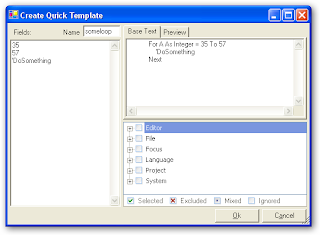
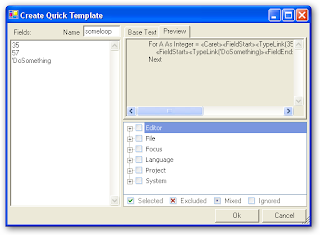
Here's a sneak peek at my new QuickTemplates plugin.
QuickTemplates is a DXCore plugin which provides a new action to complement CodeRush Templates.
Available here(Updated to 0.51), it provides a quick method to create a template from text selected in the editor.
Setup:
1. Place QuickTemplates.Dll (Extract from obj folder or compile your own from the source) to your plugins folder and start VS.
2. Assign a key to the "Create Quick Template" action. I use "Alt-Q"
Usage:
1. Select some text
2. Activate the action (Alt-Q)
3. Assign a Name to the template.
4. Enter some words/phrases (CRLF separated) in the box labelled "Fields".
5. Configure any context you require.
6. Click 'Ok'
You will now have created a template complete with fields in place of appropriate phrases.
Here are some screenshots:
QuickTemplates is a DXCore plugin which provides a new action to complement CodeRush Templates.
Available here(Updated to 0.51), it provides a quick method to create a template from text selected in the editor.
Setup:
1. Place QuickTemplates.Dll (Extract from obj folder or compile your own from the source) to your plugins folder and start VS.
2. Assign a key to the "Create Quick Template" action. I use "Alt-Q"
Usage:
1. Select some text
2. Activate the action (Alt-Q)
3. Assign a Name to the template.
4. Enter some words/phrases (CRLF separated) in the box labelled "Fields".
5. Configure any context you require.
6. Click 'Ok'
You will now have created a template complete with fields in place of appropriate phrases.
Here are some screenshots:


Friday, July 27, 2007
VS2008 Beta2. Installed and working :)
Well the download took it's sweet time, but as I say... It;s working.
Yup VS2008 Beta2 Pro is installed and ready to cook.
Note: I have also installed the very latest builds of Coderush and RefactorPro and both are working fine. I will say that I am in fact working with a "Daily Build" of each (version 2.2.4 - dated 27th July 2007) so your mileage may vary.
Sub note: If you're a subscriber to either then you to can request a "Daily Build" from the support team. Although these may not be "stable" builds. :)
Anyway back to VS2008. As I said it installed very nicely and appears to function very nicely. Worth saying that, whilst it is a little slow in places, the general experience is not bad at all.
So far I have only had time to check out 'XML-Literals' and hunt around for the Multi-Targeting (hard to find it but it's on the "Compile" tab of the project properties and is triggered by the "Advance Compile Options" button.
If there's anyone out there who is on or knows someone on the VB.net team, can you ask them to either beat the C# team into submission or alternatively cave themselves so that we can have a little more consistency in the placement of such "Cross language" features.
Having said that much Kudos to said VB.net team. I love XML Literals. Now I just have to find out how to extract data from them as simply as declaring them.
I still haven't made up my mind (Yeah as if I could have done that about anything in so short a space of time.) about whether or not I like the hyper enthusiastic intellisense.
On the one hand it does help with things like XML-Literal syntax but then it is very hard to take when it blocks Coderush's 'ms' template. (and many more I suspect.)
Ok that's it for now. I'll let y'all know how I get on as and when I discover new and cool stuff.
Yup VS2008 Beta2 Pro is installed and ready to cook.
Note: I have also installed the very latest builds of Coderush and RefactorPro and both are working fine. I will say that I am in fact working with a "Daily Build" of each (version 2.2.4 - dated 27th July 2007) so your mileage may vary.
Sub note: If you're a subscriber to either then you to can request a "Daily Build" from the support team. Although these may not be "stable" builds. :)
Anyway back to VS2008. As I said it installed very nicely and appears to function very nicely. Worth saying that, whilst it is a little slow in places, the general experience is not bad at all.
So far I have only had time to check out 'XML-Literals' and hunt around for the Multi-Targeting (hard to find it but it's on the "Compile" tab of the project properties and is triggered by the "Advance Compile Options" button.
If there's anyone out there who is on or knows someone on the VB.net team, can you ask them to either beat the C# team into submission or alternatively cave themselves so that we can have a little more consistency in the placement of such "Cross language" features.
Having said that much Kudos to said VB.net team. I love XML Literals. Now I just have to find out how to extract data from them as simply as declaring them.
I still haven't made up my mind (Yeah as if I could have done that about anything in so short a space of time.) about whether or not I like the hyper enthusiastic intellisense.
On the one hand it does help with things like XML-Literal syntax but then it is very hard to take when it blocks Coderush's 'ms' template. (and many more I suspect.)
Ok that's it for now. I'll let y'all know how I get on as and when I discover new and cool stuff.
Thursday, July 26, 2007
VS2008 Beta2
VS2008 Beta 2 is available. that's right it's here and this time I'm gonna install it.
Yup the Beta 1 only made it into a VM on my home box. This time I'm gonna just install it. Yeah I know I'm risking it all, but I heard good things about Beta 1 and I assume(yeah I know) that things have only got better. So here I go....
Yup the Beta 1 only made it into a VM on my home box. This time I'm gonna just install it. Yeah I know I'm risking it all, but I heard good things about Beta 1 and I assume(yeah I know) that things have only got better. So here I go....
Thursday, May 10, 2007
Add Namespace
I just knocked up a new RefactorPro plugin which uses the refactoring menu to Add a Namespace around a Class, Module or other Namespace
Find it in this thread of the new Developer Express Forums.
Find it in this thread of the new Developer Express Forums.
Monday, April 23, 2007
I just snapped up Winsnap
In an effort to encourage myself to create some more useful Blog posts and Wiki entries, I have purchased a copy of WinSnap by Alexander Avdonin.I feel this has to be one of the best capture tools I have ever used. It's simple, effective, "does exactly what it says on the tin".
It captures... Screens, Applications, Windows, Regions, Objects and Menus.
It Rotates, Scales, Adds Watermarks and Inverts.
It even adds curved edges to your window shots and it even has a portable edition.
The only thing it doesn't seem able to do is take shots of itself.
It has so many super powers that it must surely be in league with the devil.
Actually some would say it is.... it may not slice or dice but that's because it can hand your little screenshot off to Microsoft's Paint.
I think you'll agree that this is one capable little program.
Oh yeah and it's < 500Kb to download. and the registered edition is only $19.95
It captures... Screens, Applications, Windows, Regions, Objects and Menus.
It Rotates, Scales, Adds Watermarks and Inverts.
It even adds curved edges to your window shots and it even has a portable edition.
The only thing it doesn't seem able to do is take shots of itself.
It has so many super powers that it must surely be in league with the devil.
Actually some would say it is.... it may not slice or dice but that's because it can hand your little screenshot off to Microsoft's Paint.
I think you'll agree that this is one capable little program.
Oh yeah and it's < 500Kb to download. and the registered edition is only $19.95
Monday, March 12, 2007
Coderush Tip #1: Show References
In CodeRush 2.1.3, a feature called "Show References" was added.In CodeRush 2.1.3, a feature called "Show References" was added.
This feature allows one to 'Tab' through all references to a given variable/method. Simply locate your caret within the token of your choice and hit 'Tab'.
Your caret jumps to the next reference to that token in question.
Hit Shift-F12 (The default 'Show References' keycombo) and up pops the References Tool panel, to show you every reference to the given token in your entire solution.
Go on... Try it with int32 and see how quickly it works.
Now I couldn't leave well enough alone, and deciding that even this was too slow. (Sorry Mark :) ), I resolved to find a quicker way to access this functionality.
It was a very simple idea but one that seemed to gel better in my head.
Basically I changed the keystroke that fires this marvellous facility from [Shift-F12] to [Enter].
To paraphrase something that Mark Miller has said a few times.
So if you'd care to follow these few instructions, we'll see if we can't make life a little easier and reduce (by a very small measure) the chances of you suffering RSI.
(Note to reader: Actual chance of suffering RSI may increase as a result of taking this advice due to further addiction to CodeRush and hence coding)
1. First locate the 'DevExpress' menu in Visual Studio and select 'Options'
2. Next locate and select from the tree of options on the left, a branch entitled IDE\Shortcuts.
(Rather than remove the [Shift-F12] keystroke, we'll copy it.)
3. Locate the existing Shortcut in Navigation\References and right-click it.
4. Select 'Duplicate shortcut'
5. Select either the original or the duplicate and alter 'Key 1' so that it reads [Enter] (without brackets).
6. Change the context (the tree of checkboxes in the bottom right) to additionally check the 'System\In Nav Field' context.
7. Click 'Ok'
You're all done
Enjoy
This feature allows one to 'Tab' through all references to a given variable/method. Simply locate your caret within the token of your choice and hit 'Tab'.
Your caret jumps to the next reference to that token in question.
Hit Shift-F12 (The default 'Show References' keycombo) and up pops the References Tool panel, to show you every reference to the given token in your entire solution.
Go on... Try it with int32 and see how quickly it works.
Now I couldn't leave well enough alone, and deciding that even this was too slow. (Sorry Mark :) ), I resolved to find a quicker way to access this functionality.
It was a very simple idea but one that seemed to gel better in my head.
Basically I changed the keystroke that fires this marvellous facility from [Shift-F12] to [Enter].
To paraphrase something that Mark Miller has said a few times.
Why make somebody push 2 keys when they can press 1?
So if you'd care to follow these few instructions, we'll see if we can't make life a little easier and reduce (by a very small measure) the chances of you suffering RSI.
(Note to reader: Actual chance of suffering RSI may increase as a result of taking this advice due to further addiction to CodeRush and hence coding)
1. First locate the 'DevExpress' menu in Visual Studio and select 'Options'
2. Next locate and select from the tree of options on the left, a branch entitled IDE\Shortcuts.
(Rather than remove the [Shift-F12] keystroke, we'll copy it.)
3. Locate the existing Shortcut in Navigation\References and right-click it.
4. Select 'Duplicate shortcut'
5. Select either the original or the duplicate and alter 'Key 1' so that it reads [Enter] (without brackets).
6. Change the context (the tree of checkboxes in the bottom right) to additionally check the 'System\In Nav Field' context.
7. Click 'Ok'
You're all done
Enjoy
Help your (VB6) Code Shine
One of the reasons that I haven't been posting of late, is down to one Warren Sirota. He is the developer behind CodeShine, a refactoring addin for VB6.
Yes that's right. I said VB6....Codeshine does not attempt to compete on the same level as RefactorPro. Indeed it does not really compete at all, given that DevExpress have no interest in the VB6 space. (A fact I checked over with both Mark Miller and Ray Navasarkian) but it does manage to provide some of the fundamentals that are so hard to do without once you have been exposed to.
I'm talking about... 'Extract Method', 'Extract Function' and 'Introduce Explaining Variable'.
When I first approached Warren about his software I wanted to know if he had any plans to implement any form of 'Rename' (Local, Parameter, Field) or whether I would get any of the source to CodeShine with my purchase.
Although Warren does not generally share the source to his product, he indicated that we might be willing to collaborate somewhat in light of the fact that I was more that happy to contribute any changes back to the primary source for him to include.
And thus we find ourselves at a point at which I have managed (I think) to have produced a fairly workable 'Rename Var' refactoring which can be used to rename a private field, local variable or method parameter from either their declarations or indeed a reference to said variable.
We are undergoing a period of testing now and this refactoring may well make it into the commercial product. (US$74.95 at the time of this Blog post)
I am very excited to be able to help bring this sort of functionality to VB6.
So if you think this facility might be of use to you or you know someone else who might benefit, send them along to http://www.codeshine.com/CodeShine/default.htm and let's see if we can't help your code to shine that little bit more :)
Sunday, March 11, 2007
I've been gone, but I'm back now.
Ok I've not actually been away anywhere, but I haven't blogged properly this year and, without checking, I think it was at least November before that.
I can't believe I haven't blogged in so long. Well my apologies my dear reader (yes you know who you are :) ). I promise to be more forthcoming with the posts in future.
Look out for posts in the near future on....
CI Refactory: Damn this idea looks good. Jay, I'm downloading as I type this.
CodeShine: Best Refactoring program on the market for VB6 (Yes I said VB6)
CodeRush: The main reason I can't believe I haven't blogged in the last 3 months (That Joost post really doesn't count right?) it that I must have been all of the 5th person (outside of Devexpress ), to have used and loved the new additions to Coderush. (Refactor Pro still has a few rough edges but as always these are on the newer features which havn't had time to bed down yet.) Even though I'm the apparently the slowest person to have pointed out the latest CR goodness, I'm sure there are a few tips I can impart here and there that you might not have heard elsewhere.
So.... On with the Blog.......
I can't believe I haven't blogged in so long. Well my apologies my dear reader (yes you know who you are :) ). I promise to be more forthcoming with the posts in future.
Look out for posts in the near future on....
CI Refactory: Damn this idea looks good. Jay, I'm downloading as I type this.
CodeShine: Best Refactoring program on the market for VB6 (Yes I said VB6)
CodeRush: The main reason I can't believe I haven't blogged in the last 3 months (That Joost post really doesn't count right?) it that I must have been all of the 5th person (outside of Devexpress ), to have used and loved the new additions to Coderush. (Refactor Pro still has a few rough edges but as always these are on the newer features which havn't had time to bed down yet.) Even though I'm the apparently the slowest person to have pointed out the latest CR goodness, I'm sure there are a few tips I can impart here and there that you might not have heard elsewhere.
So.... On with the Blog.......
Subscribe to:
Posts (Atom)

 Posts
Posts

