Friday, June 19, 2009

Coderush 9.2.0 Speed and Memory Improvements FTW!!

Recently Mr Mark miller posted on his blog about how much more efficient the next version of CodeRush was going to be.

In summary -> ZOMG This will be so cool".

So at the earliest opportunity, I requested access to the latest daily build of said product and was granted access

A few notes up front:

  • If you’re going to try this out, you need to uninstall 9.1
  • This version of 9.2 is a TRIAL version. It will expire eventually. Not sure when. I didn’t ask.
    • *YOU CANNOT* install this as a registered user… Nobody (Including me) has been given this level of access.
    • *Install as Evaluation* It works just as well :D
  • This is not the release version. It is a daily build. It did not go through the usual levels of testing.
  • There is a bug in this version which prevents some things from working unless you have installed everything (including the free bits)
  • The timings below were not done using a stopwatch but by me counting (1..1000..2..1000)

I have a solution I use every day at work so I thought I’d use that as the basis for my testing.

Some facts about this solution

  • It’s written in VB.net
  • It contains 13 projects (6 Class libraries, 7 Webapps/Webservices)
  • There are no project references in this solution
    • This is strange I know.
    • Instead we reference dlls built using nant as a part of our external build process.
  • According to this LOC program my solution has…
    • Number of lines = 61,358
    • Number of code files = 503
    • Number of code-generated lines = 6,563
    • Number of user-entered blank lines = 4,355
  • The .vb code files total some 3.5 MB(ish)

Some facts about the machine I use at work

WorkMachine
(click Image for large version)

WorkMachineDetail 
(click Image for large version)

So first I needed a baseline. I disabled all addins and re-loaded studio.

Studio at rest with nothing loaded, occupied [34,020 - 50,684]

(Note: Figures represent the values shown in Process Explorer for Private Bytes and Working set respectively)

I loaded my solution and timed how long it took to reach zero CPU usage within process manager.
It took approx 15 seconds to load my solution and afterward memory usage had risen to [150,740 - 193,556]
I built the solution and memory raised a little further to [170,640 - 209,184]

So this was the baseline.

What followed was several repetitions of this procedure inserting the loading of CodeRush 9.1 and 9.2 into the sequence.

In each case I restarted studio and reloaded CR where appropriate.

I will not detail everything here, but will present the summary figures.

CoderushFigures 
(click Image for large version)

So how does this break down?

Well basically it’s all in the bottom right hand corner.

So for my modest project… (after having built an on-disk cache during the first load of any given solution)

  • CodeRush has practically eliminated any previous overhead it added to the solution‘s load time. So it’s now as quick to use CodeRush as to not use it. :)
  • CodeRush saves between 45.2% and 58.5% memory depending on how you choose to judge it.

It is worth noting that these memory savings are likely to skyrocket as the complexity of your software increases.

Indeed, I have already seen a post on twitter from a user who has something more like 80% savings on memory.

I know I’m happy with my results … How about you ? … What results do you get ? :)


Wednesday, June 10, 2009

CR_ClearAllMarkers

I am something of an anomaly….

I’ve been using Coderush now for about 3 years and I *still* don't get ‘markers’. I'm an Idiot.. I have some kind of mental block. I just can't think that way for some reason.

I expect to remain ignorant/oblivious of their use in my day to day life, until I eventually meet up with Mark Miller some day and he has the opportunity to beat me until I come to my senses :D.

In the mean time however, I suffer from a particularly mild OCDesque affliction which cannot deal with their presence on my screen.

Because I don’t use them, they are noise. Small noise, but noise none the less. The fact that they are small and noisy is part of why I don’t like them… the other part is that they are everywhere.

I was explaining my psychosis to @Fredrikeriksson on twitter. I mentioned that whenever I see these little blue and red triangles in my code I have a compulsion to repeatedly hit Esc in order to clear my system of them.

Unfortunately for me, this has a side effect of causing my caret to lurch about inside my code like a demented puppy that just found a fresh roll of toilet paper. It was whilst explaining this little disadvantage, that I realized that I could probably knock up a plugin to deal with this problem in less than 2 minutes.

As it turns out, I was wrong.

It took a full 2 minutes and 15 seconds to develop and test. However the result of this short period of development is now available for all who feel the need to partake.

I give you CR_ClearAllMarkers.

In all honesty, it’s a sham of a plugin really. All I did was create a new action which called a pre-existing method within the DXCore. as usual all the hard work had already been done for me by the Coderush/DXCore team themselves.

In any case, I would like to take this opportunity to apologize to the Coderush Team. Sorry guys it's nothing personal :)


Monday, April 27, 2009

CR_HelloWorld – Your first DXCore plugin

So for your first DXCore Plugin, we’ll show you the traditional “Hello World” program…plugin style.

We’ll show you how you can execute any managed code from a plugin – Fun stuff

First up you’ll need to Create a Vanilla plugin. From here you’ll be able to add all the relevant pieces to create CR_HelloWorld.


Ok first Step… ensure you’re looking at the designer view of your plugin. If you’ve not renamed it this will be the “Plugin1” (cs or vb) file.

DXCoreDesignSurfaceSmall

Next locate the ‘Action’ component in your toolbox and place one on the designer surface.

DXCoreControls

The set an appropriate name and a few properties:

actSayHelloWorld

Finally handle the “Execute” Action and do something within it.

This seems appropriate:

-------------------------------------------------------------
Private Sub actSayHelloWorld_Execute(ByVal ea As ExecuteEventArgs) Handles actSayHelloWorld.Execute
    MessageBox.Show("Hello World")
End Sub
-------------------------------------------------------------

Ok well that’s the majority of the work done.

However you’re going to need some way to activate this action…

So hit F5 to run up a new instance of studio to debug your new plugin.

Once this new copy of studio is running, be sure to ensure your plugin is actually running in memory.

Next we will attach your new action to a shortcut….

Open up the DXCore options screen (DevExpress\Options) Note – You may need to use the previously mentioned 'registry hack' to get the DevExpress menu to show up, if you’re running one of the Free DXCore based products.

Next select the IDE\Shortcuts page from the left hand side and you should see something like the following.

DXCoreOptionsShortcuts

In the shot you can see (Click to view full image) I have created a new ‘keyboard shortcut’ ( which I did via a context menu within the shortcut tree) and then I have filled out the Key1 and command options.

Now you can have your copy of Studio say “Hello World” whenever you choose :)

Obviously this is a something of a contrived example but, as you can see, it would be easy to have studio execute any managed code you care to dream up in a similar way.


How do I test my DXCore Plugin?

A simple enough question but it deserves a bit of thought.

You’ll recall from my previous post on creating a plugin, I suggested indicating that your plugin was a “Community plugin”

The reason for this was to prevent multiple copies of studio from loading and thus locking the plugin dll that you were working on.

So this leads you to a small problem… How to get the DXCore to load your plugin if you have explicitly asked it not to?

Well here’s how…

Simply open up the plugin manager from the DevExpress\Tool Windows\Plug-in Manager.


Side note: If you are using one of the free DXCore products, then you may not have such a menu. In order to acquire access to this most useful of facilities you’ll need to do a bit of registry hackery.
The following solution was provided in the AlexS (Another very helpful DevExpress employee)  in the DevExpress IDE Tools Forums
-------------------------------------------------------------
Please invoke the Registry editor, add the "HideMenu" DWORD value to the following Registry key, and set its Value to 0:

HKEY_LOCAL_MACHINE\SOFTWARE\Developer Express\CodeRush for VS\9.1
This should make the "DevExpress" menu visible.
-------------------------------------------------------------

DevExpressPluginManagerMenuOption

…to reveal this…

PluginManagerHelloWorld

Simply double click the entry you would like to load and, after confirmation your action, the DXCore will load your plugin.

All should now be good and you can commence testing your plugin..


What is a DXCore Action?

An action is one of the components you can drop on your plug-in design surface.

When you do so it looks like this ....

DXCoreAction

It can be triggered via either a mouse or keyboard shortcut (found in the IDE shortcuts page of the options screen) or placed on a menu (for example the context menu of the Code Editor)

It is a derivative of ‘system.component’ adding a few properties…

 DXCoreActionProperties

…and events…

DXCoreActionEvents

Some of these are worth drawing special attention to.

Properties
ActionName: The name of the action as displayed to UI like the commands dropdown in the IDE\Shortcuts options page.
ButtonText: What text would you like to represent this action when it is placed on a menu?
CommonMenu: A list of some of the more common menus found around VS.
ParentMenu: An alternative to CommonMenu. Use the name of any menu you know of, to place the action on that rather than one of the ‘common’ ones.

Note: The placing of Actions on menus is entirely optional and CommonMenu and ParentMenu are mutually exclusive options.

Events
Execute: The main event (so to speak :)). Fired whenever the assigned shortcut is triggered or the representative menu item is chosen. This is how the Action does it’s stuff.

In my next post I will walk you through your first actual plugin … Yes we will be starting slow, but we’ll ramp up fairly quickly as the posts flow… so you’ll be knocking out your own custom refactorings and the like pretty soon.


Wednesday, April 15, 2009

CodeRush 9.1.3 Community plugin support.

In the latest drop of the IDE Tools, the community folder experience has been enhanced.

Previous versions of the installer placed the community folder within the DevExpress folder structure (beneath Program Files).

This new location has several benefits:

1.> Creating a new plugin should (untested) no longer require you to launch VS with Admin rights. since your plugin ins not being rebuilt under program files :)

2.> Uninstall will not remove community plugins. (Shouldn’t have anyway but this really seals it.)

3.> Community folder will be immune to path changes as the version numbers of the IDE Tools increase.

As of 9.1.3, the Default folder for community plugins is now “{My Docs}\DevExpress\IDE Tools\Community\Plugins”


Monday, April 13, 2009

Creating a new DXCore Plugin

[Updated: This post has been updated to account for some small changes in the 9.1.3 release]

There are certain steps you must follow in order to create a DXCore plugin of any kind. This blog post will outline and explain those steps.

So the first step is to create the right sort of project.

If all is installed correctly you should be able to find the 2 available projects (‘Standard Plug-in’ and ‘Tool Window Plug-in’) in the DXCore section under either the Visual Basic or Visual C# sections in the New Project dialog.

Initially I’ll suggest that you pick ’Standard Plug-in’ as you can always add the Tool window later if you need to.

FileNewDXCorePlugin

Once you’ve given your plugin a Name, and hit Ok, you’ll be presented with the Plug-in Project settings dialog.

 InitialPluginSettings913_thumb5

Plug-in Type: System Plug-in: will cause your plugin to be deemed a ‘System plugin’ Duh! But what does this mean? Simply put, system plugins are loaded ahead of non system plugins. 90% of all plugins have no need to do this… I have yet to use this facility in any plugin I have written.

Plug-in Type: Plugin: Will cause your plugin to be built to “IDETools\System\DXCore\Bin\PlugIns\”. I’m guessing that this is something that DevExpress do themselves. Although I see no reason not to use the Community option.

Plug-in Type: Community Plug-in: is a new option with version 9.1.3. This is due, from what I can see, to the new Community Plugin Path option. This option sets the compile path of your new plugin, to your current community folder (Setup when you first loaded CodeRush or RefactorPro or DXCore after installing 9.1.3.) This means that, if you accepted the default, your plugin will exist under your ‘My Docs’ folder and as such will not require you to Launch Visual Studio with Admin rights in order to compile your plugin. – You should pretty much always pick this option.

Checking ‘Load manually’ will cause an entry to be added to the ‘plugin manager’ (another plugin), which in turn will prevent the DXCore from automatically loading your plugin.

Why would you do this?

Well, suppose that whilst developing your plugin, you are suddenly required to do something else. (Heaven forbid that anything should come ahead of this most important work). What you do is you go and immediately fire up another copy of VS and you load what ever you need into that session and off you go.

The trouble is that (assuming that you’ve compiled your plugin at least once) DXCore has now loaded a copy of your unfinished/unpolished plugin into memory. This might not be a problem but there are 2 ways I can think of that might mean it is…

1.> You’re writing the most killer refactoring known to man, and you’ve just completed the ‘DeleteAllThisUselessCrap’ routine but haven’t quite gotten around to writing the ‘InsertGloriouslyShineyCode’ and if activated, without taking suitable precautions then you could be up the swanny.

2.> You might want to tab back to to some more development on your plugin whilst you’re waiting for the results of your latest check-in on your ‘Important project’, but unfortunately the copy of VS hosting your ‘Important Project’ is maintaining a lock on your plugin’s dll and as such you’ll be unable to compile it, much less test it.

So in order to avoid these scenarios, I always tick the ‘Load Manually’ tick box which then ensures that the DXCore never *automatically* loads my plugin. Then when I launch a copy of VS for testing it, I locate it in the plugin manager and double click it in there. At this point DXCore wakes up, notices the plugin and loads it. In doing this you have only loaded your plugin into the address space of a single instance of VS, which exists entirely for the purpose of testing your plugin. This also means that when you shut down this single copy of VS, you’ll be able once again to resume development of your plugin. Great huh?

Note: This setting is local to your development installation only and will not affect any users of your plugin.

Default Load Type

I asked AlexZ (one of the great brains behind the DevExpress IDE Tools) about the ‘Default load type’ setting (and most everything else as well :) – Alex is a great source of info) and he had this to say:

On Demand - plugin is loaded when some event happens for which plugin should work. e.g. if you plugin contains some action - then it will be loaded only when action is being executed. Or it may define context or string provider or any other provider - and plugin will be loaded when provider is really accessed.
On Idle - Plugin will be loaded on editor idle, IOW when VS editor is being idle.
At start-up - Plugin will be loaded on start-up - however it will add time to overall loading time.

So which one should you select.. well the answer is it depends.. Personally I typically leave the default of ‘On demand’ in place as this means your plugin should not affect the start-up time of VS. This might mean that you have a minor slow down as you activate your plugin for the first time, but it will not contribute to slowing down the start up time of VS.

So to summarize… I recommend that you tick the ‘Load manually’ option and leave everything else (except perhaps the name) exactly as default … then hit Ok

At this point VS churns away and provides you with a nice clean plugin project ready for you to create the greatest plugin known to man… after all .. that’s what you were going to do right :)

I am now contractually obligated to make you wait until the next instalment before I reveal anything else :)


DXCore Plugin Types

A single DXCore plugin dll can perform a single simple task or many different functions. These functions are added to a plugin by adding various components to it’s design surface. These components will need various properties set and events handled, but the process is typically quite simple.

These components include:

  • Action – A simple object which represents any arbitrary piece of Code you like. Placable on many of the VS menus and assignable to a keyboard or mouse shortcut (optionally in combination with a context) using the DXCore IDE\Shortcuts option page.
  • RefactoringProvider – Used to add items to the ‘Refactor’ Menu in RefactorPro
  • CodeProvider – Used to add items to the ‘Code’ menu in CodeRush. It differs from the RefactoringProvider in that by convention items placed on this menu are allowed to alter the functionality of the code they affect
  • IssueProvider – Used to add ‘Code smells’, ‘Warnings’ and the like to the CodeRush ‘Code Issues’ feature.
  • CodeMetricProvider – Used to provide additional metrics for both inline metrics and the Metrics tool window.
  • ContextProvider – Used to add items to the Context Tree. This in turn is used to indicate suitability of Templates, Shortcuts and other Coderush facilities.
  • NavigationProvider – Used to add extra Items to the Navigate SmartMenu
  • SmartTagProvider – Used to add a new section to the DXCore SmartTag menu. Items like the existing ‘Refactor’ and ‘Code’ menu sections
    StringProvider and TextCommand – used to enhance existing features like templates, selection embeddings, Selection Inversions and others. Both perform some function, but the StringProvider returns a value to it’s calling mechanism where the TextCommand does not.

Depending on the type of functionality you are after, you may not need to place any additional component on your plugin. The plugin object itself has several properties and events that, when properly used, can provide some very useful effects.

Over the course of the next few blog posts I am hoping to provide some insight into the general process of creating a plugin, as well as the facilities provided by each of these components.


Thursday, April 02, 2009

Community Plugins for CodeRush 9.1

DXCore 9.1 introduces a different directory structure for the IDE Tools (CodeRush, RefactorPro) based on it.

Similarly you will need to move any 3rd party plugin assemblies you rely on to “C:\Program Files (x86)\DevExpress 2009.1\IDETools\Community\PlugIns”

Please adjust this path according to the setup of your own machine (System/install drive, x86 Vs x64)

All community plugins I have tried so far appear to work fine. If you know better please feel free to contact me via the comments.


Thursday, March 19, 2009

CodeRush and Refactor 9.1.0 Beta

-------------------------------------------------------------
Update: Since the full release of CodeRush and RefactorPro 9.1 Mark Miller has posted his own feature list. I’m amazed how much extra there is in this release that I completely missed.
-------------------------------------------------------------

Well the guys (and maybe gals who knows) at DevExpress are clearly very busy.

They’ve released a beta of their DXperience (v9.1.0) suite of Controls, Frameworks and Tools

This release (beta though it is) represents the first time that CodeRush and RefactorPro  have been made available in a single install together. The downside for now is that you have to download the entire 252Mb which represents their entire line-up.

Having got 9.1.0 (I only installed the IDE tools for now), I immediately noticed a few changes.


"New user" experience

The first time you run this new version of CodeRush, you’ll be asked what sort of user experience you’d like.
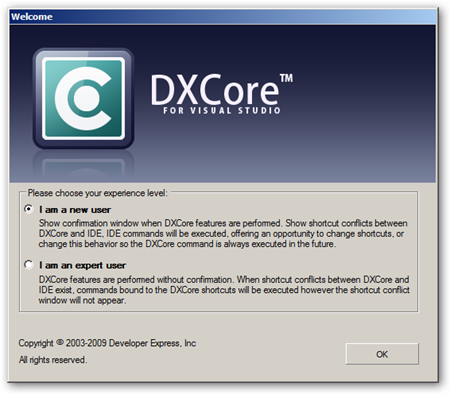
CodeRushUserMode

If you pick the first option then the DXCore (on which RefactorPro and CodeRush are based) will warn you when it expands a template or intercepts a shortcut giving you an opportunity to decide if that's the behaviour that you'd like.

HotKey Help

If the hotkey you hit used to does something in Studio normally, you'll be reminded of what that was/is and given the opportunity to disable the CodeRush Template or Hotkey. DXCoreChoice

In the above screen shot, I have used the ‘Tab’ key whilst the caret is positioned within an identifier in the editor. The popup, which in true CodeRush fashion, is Non-Modal, appears and presents you with a few options.

You can…

  • Change the CodeRush Binding for ‘ReferenceNext’ from ‘Tab’ to another key.
  • Change the Visual Studio Key binding for ‘Edit.InsertTab"’ from Tab to another key.
  • Tell DXCore to ALWAYS suppress ‘Edit.InsertTab’ in favour of ‘ReferenceNext’ (for this binding and assuming an appropriate context)
  • Tell DXCore to NEVER suppress ‘Edit.InsertTab’ in favour of ‘ReferenceNext’ (for this binding)

Template Help

If you were to type…
-------------------------------------------------------------
c<space>
-------------------------------------------------------------
…in an empty vb file you’d see the following popup.CoderushTemplateExpandWarning

The template expansion has already happened in the background, but can be reversed with a simple Ctrl+Z. In the mean time you get to see the effect of the template and options to allow this in future or not. Further you have the option to visit the ‘Templates’ options page which will open on the template you have most recently used and give you the opportunity to change some aspect of the way it works

This "’New User’ selection allows you to see what CodeRush/DXCore is doing and to decide if that suits your needs.

One word of warning… The CodeRush Template trigger phrases are designed to be memorable and simple to type. for this reason they typically contain the fewest number of keystrokes possible. for example you might have  For this reason you might find that they attempt to expand when you use variables with particularly few characters like ‘c<space>’ will expand (outside of a class) to the  template you saw above and ‘dr<space>’ will expand to the phrase ‘DialogResult’.

If you typically use variables with small numbers of characters, then is likely that you will find CodeRush expanding code all over the place. This ‘New User’ facility will help to at least explain this what is happening. However I would urge you, if this is the case, to consider using longer variable names. This will result in more readable code and CodeRush will more than save you the extra keystrokes that you will type as time passes.

If instead of the ‘New User’ option, you pick the "Expert User", you’ll default back to the standard situation where DXCore intercepts and overrides VS where keystrokes overlap without notifying you.

DXCore Toolbar

The DXCore Toolbar is a standard VS toolbar which allows you to toggle various UI features added by CodeRush.

DXCoreToolBarThese are:

  • Code Issues
  • Spell Checker
  • Member Icons
  • Flow Break Indicators
  • Code Metrics
  • Structural Highlighting
  • Region Painting
  • Right Margin Line

No word yet on how other plugin providers might extend this facility to their own UI plugins, but I've already gotten good use out of the Code Issues button.

Code Issues appears to be fast enough now to allow me to code without a slowdown of any kind, but there are times when I need to really concentrate on a particularly complex piece of coding. In these circumstances the radio is turned off (to remove the audio distraction) and Code Issues is put away (to remove what, in said times of concentration, can be viewed as visual clutter).

We used to have to visit the correct page in the hierarchy on the options screen in order to find the right option for each of these. now you simply click the right button. It's so simple but so effective. And being a VS toolbar itself, it is discreet and fits in very well with it's surroundings.

Code Issues

Not immediately apparent until you actually use it, is the fact that CodeIssues has undergone some changes to it’s UI.

For the uninitiated, Code Issues (Sometimes referred to as Code Analysis) has been available as an early access feature for some time now. It provides Graphical cues to code smells within your project/solution.

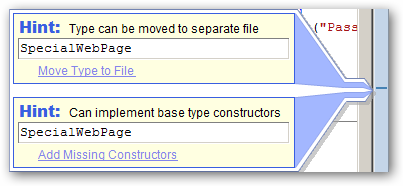
Since the UI make over, we now have nice bright informative popups to make very clear to us what is potentially wrong, or what might be better done another way.

Some sample Code Issues are:

CodeIssuesUnusedDeclaration

CodeIssuesRedundantNamespace

CodeIssuesSpecialWebPage

Additionally, an interface accessible from the left of the code file, allows you to navigate through the Issues….


CodeIssuesInterfaceLeft

…and even suppress the ones you aren’t interested in seeing in the future. (By Solution, Project, File or just everywhere)

CodeIssuesSuppress

Under the hood

Under the hood there are a few changes as well. The once simple folder layout has been altered to include not 1 but 7 plugin directories. Well 7 directories if you install everything that comes with the beta of the IDE Tools.

There's one directory for each of :

  • CodeRush
  • CodeRush Xpress
  • DXCore
  • RefactorPro
  • Refactor VB
  • Refactor CPP
  • Refactor ASP

As well as a few support directories. A little digging suggests that with a quick registry addition, we can create a pointer to a new directory for the plugins from our Community Plugin Site.

Build it yourself

Finally 2 of the 'Labs' plugins which have previously been available only on request, now ship with the main products. Both the 'Memory Lab' and 'Expression Lab' are available from the "DevExpress\Tool Windows\Diagnostics" menu

These plugins are used to analyse code and memory usage to aid in the construction of your own plugins.

Final version

Who knows what might change or be added in the final build of this version of the IDE tools. I do know I like what I've seen so far and this version (beta though it is) will be staying on my machine until another version comes along to replace it.

This Beta is only available to existing DXperience subscribers. Note this means any level of DXperience including DXperience ASP.NET, WinForms, Enterprise and Universal. If this is you then feel free to drop by the Client Center (http://www.devexpress.com/ClientCenter/)  and look for the Beta Tab.

It’s worth mentioning once again, since so many seem not to know, that Microsoft MVP’s are entitled the Universal variant of this for free. If you’re an MVP who would like a Free licence of everything.Net that DevExpress do (including Components, Frameworks and IDE Tools + Access to this new beta), then contact ClientServices@DevExpress.com


Tuesday, March 17, 2009

The walk to School

This morning my wife (Anne) was walking the kids to school and she related the following story to me about the journey.

Daniel (5) suddenly jumped… He became very concerned, worried and then frightened.

“Mummy… What was that..?!?!?”

“What do you mean dear?”

“That noise! That noise! What is it ?!?”

Sounding more and more frightened he started backing away from the road towards the nearest fence.

“What’s that noise!?! I don’t like it!!”

Daniel was looking around himself, as he didn’t know where this ’Noise’ was coming from.

Our son Daniel, has recently (Last Friday – so approx 4 days have elapsed) undergone minor surgery to insert grommets into his ears to fix a condition called glue-ear.

My reaction to hearing this story was the same as Anne’s at the time.

Had something gone wrong?

Was he now suffering some horrible form of Tinnitus or something worse?

Anne tried to calm Daniel down but he was very unnerved. They started to try to work out what the noise might be. It wasn’t the Cars or nearby people talking. It wasn’t constant, but very small (short) and spaced out by about 3-4 seconds in bursts. Daniel can’t describe all these concepts (burst, short noise) but mothers are very good at extracting this sort of information from their children.

Gradually Anne got Daniel to indicate when he was hearing the noise, telling him all the while that everything was fine and that nothing was going to hurt him.

Anne was listening all the while to see what she could match up the nearby audio with the timing that he indicated.

Then it dawned on her…

Calm descended on her…

“Daniel”

“Yes Mum”

“It’s Ok…I know what it is”

“What is it?”

“It’s the birds…They are singing”

“Singing Mum ?”

“Yes Daniel they tweet and sing.”

“Oh…(calming) …Oh… (breathing easing) …ok …(starting to relax).. ok ”

“Daniel..have you never heard birds sing before?”

“No mum never…It’s nice…..Can we get a bird?”

“No Dan… Sorry they would cost too much for us to keep one”

“Oh ok mum (slight note of disappointment)……(Pause)… Mum when I get home after school, can I sit in the garden and listen to them? (hopeful)”

“Absolutely Dan… No problem (beaming)… Now shall we get you to school”

“(furious nodding and smiling)”

So I would like to take this opportunity to thank those Nurses, Surgeons and frankly all other members of Poole General Hospital for their wonderful work in bringing my son the gift of being able to hear the birds sing.

You will never understand how much this means to him and us :)


Monday, March 16, 2009

CodeRush and Dark Color Schemes

It has been noted that the default colors for CodeRush are a little hard to see if you use a darker color scheme.

I asked about on twitter and it seems not many so far have bothered to tweak the default settings for such a scheme. However David O’Hara is one man who has certainly taken up the challenge. Personally I’m in favour of the lighter side of schemes but for those of you who have turned to the dark side here is a copy of the “painting” settings within CodeRush which David uses to achieve the following affect on his “Vibrant” color scheme.

Code


FlowControl


CodeRush Wish list

Everyone (in the Tech world) who knows me, knows I am a big fan of the DevExpress stack ( DXCore, Coderush, RefactorPro)

I will grant you that we could always do with more perf / stability. (Although I haven’t had issues with either of these in the DevExpress stack for some time)

However I thought I’d sit down for a few minutes and try to bash out  a short list of improvements I’d make to CodeRush if I were in charge :D (Hey we all know that’s never going to happen so this is the closest I’m gonna get :)

This is just a small list of things that I feel would make CodeRush that little bit better.

Multi file templates

Ok I lied… This feature wouldn’t make CodeRush a little bit better. For me at least this would add hugely to Coderush.
I’m quite sure that the possibilities for this go well beyond what I’ve thought of.

So what is a Multi-File template?

Well simply put, it is a template whose output results in text being injected into multiple (possibly not yet existing) files.

For example I could “Create New Form” using…
-------------------------------------------------------------
CNF<Space>
-------------------------------------------------------------

In Winforms Project, this would create a Form1.vb and Form1.designer.vb, links the 2 and creates suitable multi-file linked fields for phrases like Form1 throughout.

The same template should work inside an ASP.Net App, an MVC App and a WPF App, creating suitable forms in those circumstances

This could easily be extended to work for WebServices, UserControls and many other types.

With the right templates in place, you'd never need to visit the "File Add New" dialog again :)

[Update: So this turned out to be so easy I built it myself]

Enhance 'Go To Definition

I really like the ability to leap from one part of the code to another in a logical fashion but we have developed a in-house practice which makes this rather difficult.

We don't use project references.

Instead, every reference made in a solution built by us, is to a dll already built at an earlier stage of said build.

We use file references in order that large solutions may be broken down into smaller ones with a subset of the projects that exist in the whole. This may be done by copying the Solution (or using save as) and then any projects not being edited may be deleted.

The down side of this is that when I select 'Go To Definition' for an object in one of those other assemblies, I will invariably end up in the object browser.

I would really like CodeRush to look around the solution and recognise that there is a project in the solution which has the exact same namespace structure as the item I am attempting to locate the Definition of and redirect me to the source of that item.


Setting Schemes

Allow me to copy my settings to multiple named instances and allow me to switch between them. This does not need to be quick, but I could have a 'full' set, a 'slim line' set and an 'experimental' set.

Due to the recent inclusion of the Plugin Manager ToolWindow, we would be able to define schemes of plugins. so we could switch to a very minimal set of plugins in order to enhance speed.


Setting Export/Import

I would love to be able to create a “Selection Embedding”, “Shortcut”, “Template” or other setting and be able to export it to a file something like a .reg file.

I could then hand this file to a user or post it on my blog or attach it to a forum post.

CodeRush/Refactor/DXCore would have installed and associated a new utility with files of this type in order that a simple double-click would be treated as a request to absorb these settings into your current DXCore installation.

Naturally DXCore would detect if you had multiple sets of settings and ask you which ones you wished to affect with this file… Offering you the chance to backup these settings prior to this if needed.


Filterable Toolbox

There are so many items in the toolbox these days, especially with the DXperience controls, that it can be quite hard to find what you’re after.

This could be solved with the introduction of a search box at the top of the toolbox. This would probably just restrict the showing toolbox items based on an incremental contains search using the text currently in the search box. It would probably be fair to remove the tabs during such a search but this could be optional.

In simple terms, it would work like the Vista Start Menu


These are just a few things which I feel would make CodeRush even better.


Is Dynamic is too dynamic?

I was just watching the start of a screencast by Kirill Osenkov.

In it he describes some of the new features for C# 4.0 starting with the dynamic keyword.

Take for example the following…
-------------------------------------------------------------

static void main()
{
    dynamic SomeVar = 1;
    SomeVar.Foo();
}
-------------------------------------------------------------

Now while I appreciate the ability to call into dynamic methods in this way… I feel it’s too easy to get things wrong.

I can call into this dynamic method several times and any mistakes made are simply not detectable until runtime.

So I can call a method correctly several times and then call it incorrectly once also and not notice the mistake until my programming logic is enacted at runtime.

-------------------------------------------------------------

static void main()
{
    dynamic SomeVar = SomeOfficeToolbarFactory.GetMeAToolbar();
    SomeVar.Show();
    SomeVar.Hide();
    SomeVar.Show();
    SomeVar.Hide();
    SomeVar.Show();
    SomeVar.Hide();
    SomeVar.Show();
    SomeVar.Hide();
    if (SomeSpecialConditionHere)
    {
        SomeVar.Showww(); // <- this does not exist at runtime.
    }
}
-------------------------------------------------------------

What about if I could define the dynamic methods that I expected to exist on a given type at runtime?

What if you could define a “dynamic partial interface” for any type which would list said methods?

So in VB.Net terms I could say…

-------------------------------------------------------------
Dynamic Partial Interface SomeOfficeToolBar
    Sub Show()
End Interface
-------------------------------------------------------------

If this definition existed then the compiler could detect that “Showwww()” was incorrect before runtime.

“Show()” and “Hide()” would still be detected and used dynamically but you would giving yourself design time aid in finding bugs in dynamic calls.

I guess it’s a bit like defining your external functions using a .h file in C++

Now technically this would no longer be a dynamic type. It would still be a static type. However you would have added the ability to statically check the code that made calls to methods which would be located dynamically at runtime.


Just a thought.


Thursday, February 12, 2009

Updated HighlightCurrentLineInEditor

Just a quick note to inform of an update to the HighlightCurrentLineInEditor plugin.

The plugin now has an additional option allowing you to specify a color for the text within the highlighted area.

Further, all colors are *defaulted* to those currently used by studio for selected text. (Navy and White in the default schema)

This allows the plugin to use better default values for color schemes other than default (darker ones for instance).

If you have previously used an older version of this plugin, you can install the newer one and hit the “Default Settings” button on the options page.

The new version (1.0.0.193) of the plugin is available from http://www.rorybecker.me.uk/DevExpress/Plugins/Community/HighlightCurrentLineInEditor/


Thursday, January 29, 2009

VSTricks

If you haven’t seen it already, I suggest that you check out the VSTricks section of Scott Cate’s site.

The introduction is here but for the lazy…

Sara Ford recently (well December) finished her 17 month long “Visual Studio (2005/2008) - Tip of the day” series. (That’s 382 posts.) The posts are obviously still there (check out VS2005Tips,VS2008Tips) to be read by anyone who cares to drop by.

Since then however Scott has taken it upon himself to declare “My hope is not only to enhance your (Sara’s) original Tip Of the Day posts by adding video samples, but also continue to create new posts for tips and tricks from the Visual Studio team.”

No small order considering the amount of time taken to create, edit, upload and host that many videos. Still he’s off to a great start with already 30 videos up at the time of posting. I have already subscribed to the VSTricks Rss feed, and you should too.

So please stop by and check it out.. I’m sure there’s something there you didn’t know and keep checking back as Scott has set himself one hell of a challenge and will need all the support he can muster in order to keep going. :)


Tuesday, January 13, 2009

Get a free Typemock Isolator Licence.

I’m always happy to see people pushing Vb.Net…I doubt I’ll qualify for a free licence but who knows :)

-------------------------------------------------------------
Programming Visual Basic applications?

Typemock have released a new version of their unit testing tool, Typemock Isolator 5.2.
This version includes a new friendly VB.NET API which makes Isolator the best Isolation tool for unit testing A Visual Basic (VB) .NET application.

Isolator now allows unit testing in VB or C# for many ‘hard to test’ technologies such as SharePoint, ASP.NET MVC, partial support for Silverlight, WPF, LINQ, WF, Entity Framework, WCF unit testing and more.

Note that the first 25 bloggers who blog this text in their blog and tell us about it, will get a Free Full Isolator license (worth $139). If you post this in a VB.NET dedicated blog, you'll get a license automatically (even if more than 25 submit) during the first week of this announcement.

Go ahead, click the following link for more information on how to get your free license.
-------------------------------------------------------------

I myself have a personal Vb.Net project I think could really do with my applying this sort of methodology to it. :)


Saturday, November 29, 2008

Playing Catch-up

Damn it's been a while since I blogged... And everything seems to have happened in the last week or so.

DevExpress Launch CodeRush Xpress

CodeRush Xpress is a cut down and combined version of CodeRush and RefactorPro which has been made available (through some kind of licensing deal with Microsoft) to all C# developers.

It includes ...

  • Duplicate Line
  • Highlight All References
  • Increase or Reduce Selection
  • Smart Clipboard Operations
  • Generate from Using (TDD)
  • Quick Navigation Window
  • Quick File Navigation

…and also include 25 refactorings from RefactorPro including…

  • Extract Method
  • Flatten Conditional
  • Inline Temp
  • Introduce Local
  • Make Explicit
  • Make Implicit
  • Move Type to File
  • Use String.Format

DevExpress launch CodeRush and RefactorPro 3.2.1

The full change list is here –> http://www.devexpress.com/Support/WhatsNew/NET/IDE.3.2.1.xml but for me the most important change is that the IDE tools appear to be much more stable and performant whilst using less memory. All this despite my turning on Code Issues, a feature that during it’s beta phase… had been known to consume vast swathes of memory.

Several new Refactorings and Code menu items are available including one “Make Extension” which rewrites the chosen method as and extension method whilst doing all the legwork of referencing the correct System.Core.dll, Creating the module and adding the attribute to the method.

Very nice.

CodeRush Plugins

In the plugin arena, we have had recent contributions from Jim Argeropoulos in the form of RedGreen. RedGreen is a plugin designed to present you with an in-editor test runner mechanism. This plugin is a work in progress but is still very serviceable… Although it appears that you currently need to install Gallio


Friday, August 22, 2008

I'm off on holiday.

Just a quick note to anyone who finds this.

I'm off on holiday for a week starting some time in the next couple of hours for about a week.

So anyone hoping for me to be building versions of the Community Plugins is out of luck until Sat 30th at the earliest.

Sorry about that :)

Still this is the first holiday greater in length than a weekend since my honeymoon over 4 years ago.

True we are staying in the UK (camping holiday in Newquay) but with 3 kids 6, 4 and 2, it should be entertaining anyway :)

I'm reasonably sure no-one will even notice I'm gone :)

Catch you all on the flip-side :)


Tuesday, July 01, 2008

DXCore Community Plugins (Suite)

Just a quick note to those following my blog, that I have uploaded a collective zip file containing the latest version of all community plugins to http://www.rorybecker.me.uk/DevExpress/Plugins/CommunitySuite/

This file has the postfix 1.0.0.90, which in keeping with it's contents, reflects the version of the repository as a whole which was used to generate the contents within.


We now return you to whatever you were doing before. :-)