Monday, May 24, 2010

Template Driven Assembly References


In comments on my previous post @BlackMael asked about doing something similar to DX_NewItem, only with assembly references instead of Project Items.

That sounds like a challenge to me :D

My answer to this is that there already exists an AddAssemblyReference TextCommand in CodeRush. But that ‘s only useful if you know what to do with it.

So here’s a quick guide on setting up a “Dynamic List” of Assemblies

  • First Create a new Dynamic list (DevExpress\Options  Core\Dynamic Lists)

DynamicList0   

  • Then populate it with Assembly names and suitable mnemonics

DynamicList3DynamicList1

  • Finally create a template that references the variable used in the list.

DynamicList2

You’re done!

You can now use ‘ar’ in combination with any Assembly added to the assembly list and CodeRush will add your assembly reference without ever needing to go near the dreaded “Add Reference” Dialog


New CodeRush plugin ‘DX_NewItem’ replaces ‘Add New Item’ dialog

Note:This plugin requires the full version of CodeRush (Or a trial of same). Xpress is not supported at this time.]

I’m sick of visual studio’s ‘Add New Item’ dialog.

It’s filled with way too many items I’ll never use and it’s slow to use.

So I’ve created a CodeRush plugin to replace it in > 90% of cases.

Now I’m sure you already use CodeRush templates to create classes, methods , Interfaces and the like, but what about when you need to create something more complicated.

Something with multiple files. Something which studio is already capable of creating and where creating a CodeRush template would take too long.

Wouldn’t it be nice if you could ask CodeRush to trigger a Visual Studio Item template without having to muck around in the “Add New Item” dialog trying to find it first?

Well now you can!

  • Locate DX_NewItem
  • Deploy the dll to your plugin folder
  • Extract the settings file to the correct location
  • Create a single CodeRush template

and you’re done (full instructions here)

Now you have the benefit of the ‘an’ template. ‘an’ is a mnemonic for ‘Add new

For example:

anwf<space> – add new win form to your project.

anxf<space> – add new xml file to your project.

andxp<space> – add new dxcore plugin to your project.

[Note: Other Templates are already catered to… See the ‘Templates’ list on the ‘Core\Dynamic Templates’ (advanced) option page – ]

How sweet is that?!!

I’ll be adding support for other items as time goes on, but you can already add your own via the instructions on the wiki page

And now for something more visual:

DX_NewItem


Friday, May 21, 2010

CodeRush 10.1 hits RTM


Yes I know I’m a bit late with this news but I was on twitter this morning and noticed that people were still under the impression that CodeRush 10.1 was still in beta.

So let me set the record straight… Here are the facts:

  • CodeRush 10.1 (along with DXperience) hit RTM at approx 21:40 BST on 19th May.
  • CodeRush is available to subscribers from the DevExpress Client Center
  • CodeRush Xpress (Still Completely Free!!!) is available from it’s own page
  • A trial of CodeRush (Full version) is available from this page
  • The current version is 10.1.4
  • CodeRush 10.1 works under VS2010, VS2008 and VS2005
  • CodeRush has a new Color Picker which absolutely rocks in *any* color related scenario (WPF, CSS, VB, CS)
  • The Graphical API has been rewritten to the account for the changes in VS2010
  • Microsoft have requested that some features be removed from CodeRush Xpress under VS2010
    • This is believed to be because they introduced ‘similar’ features in VS2010 that they wanted to promote.
    • Such features include QuickNav, QuickFileNav, Tab To Next Reference, Highlight References and several consume first Code Generators
    • These features all still work under VS2008 and VS2005
    • These features all still work in the Trial or Full versions of CodeRush
    • MS paid to license CodeRush Xpress to all users of VS Pro or higher, so frankly they have the right to say what they’re willing to pay for. It kinda sucks but this is actually not unreasonable.

So go out spread the word “CodeRush has come to VS2010” - Which means VS2010 is finally usable :D


Friday, April 30, 2010

How much faster is CodeRush ?


Recently DevExpress released a video which compared the rename functionality in CodeRush to that of in of it’s competitor products.

There then followed some discussion on Twitter, about how valid the tests were.

Questions were raised like “Why would anyone want undo like that ?” and comments were made like “He probably used a pre-release version of ‘Brand X’ productivity tool. They’re always slower than the RTM versions”.

These are potentially fair points. Lets see if we can address them.

“Why would anyone want to do that?”

First up “Why would anyone want undo like that” . Now I must confess I’ve can’t now find the tweet in question in order to quote this properly, but the person who mentioned this appeared confused about why anyone would want to do an undo at that point in time.

[To put this statement in context… the DevExpress Video shows a rename of a local symbol using the Brand X product, occurring at approx 0:30 of said video, and then shows the effect of trying to undo this at approx 0:40]

Why should being able to undo something be unnecessarily restricted. I frequently get called away in the middle of something, come back, wonder what I was doing exactly. Sometimes undoing and redoing is a good way to remember.

In any case I don’t think there is any point at which it should be suggested that undo is unreasonable. If your tool is telling making anything that you do this awkward and error prone, IMO you should re-evaluate if it’s helping you or not.

Bottom line: This clearly works in CodeRush… It clearly doesn’t work in Brand X.

“It was probably an unfair test using a pre release version of Brand X”

Well I can see why some people might think this. DevExpress did this test, and they did it on a one of their own solutions. This does make it kind of hard to verify independently, since they’re hardly about to hand out the source of CodeRush :D

…and so I decided to do my own test :)

You might say that I am biased also. However the test I conducted is reproducible by anyone who cares to do so using their tool of choice.

  • I started by selecting an open source project that anyone could get hold of. I chose Paint.Net version 3.5.5
  • I then downloaded the latest version of CodeRush 10.1 (This will soon be available to anyone as RTM is imminent) and the latest version of Brand X (Available from their main page. Can’t get less pre-release than that :D)
  • Both tools were installed and in each case, whilst a test was being done, the opposing product was disabled.
  • I restarted Studio for each test and allowed the CPU to settle after loading the solution before starting the test.
  • I used a quad core machine with 2GB RAM (Yeah I know I need more RAM) running on Win7 x64 (My home machine)

And so I looked around for something in the solution which would have a lot of references.

After some fairly casual looking around, I couldn’t find anything with more than about 50 references. Then I had a brainwave…. I’d rename the main namespace. [Note:CodeRush took all of 4.1seconds to tell me that there were some 416 references to this in 197 files.] This seemed like it would be enough of a test.

What followed was a fairly boring, so frankly I’ll skip straight to the results:
[Note: If you’re interested in the details, they’re pretty much the same as the CodeRush Video at 01:53]

Product Time to rename
CodeRush 22 seconds
Brand X 4 minutes and 28 seconds

Conclusion

So with the latest versions of each product, and a test you can reproduce yourself if you really want, to my conclusion is:

Mark Miller is wrong.
CodeRush is not 10x faster than Brand X….. It’s 12x faster :D

With a difference this big… I couldn’t just have made myself a Coffee…. I could have ground the beans myself.


Wednesday, April 21, 2010

New ‘Color Swatch’ Feature in CodeRush 10.1

Update: Mark Miller has since addressed this feature much more thoroughly

I’m sure you recognise at least one of these…

#2387d4 &h23 &h87 &hd4 0x23 0x87 0xd4


Apparently, these are all representations of color.

Did you ever think that, for something designed to represent color, that … well … They’re not very colorful are they?

So how about something better? Something designed to give you a little more relevant information on the color you’re talking about:

ColorSwatchCode

This little strip of color will also appear in C#, WPF and HTML code.

If you click the bar itself… You are presented with….

“The most glorious color picking dialog known to Dev”. – Rory :P

This first shot shows, an incredibly granular, ‘Picker’ tab.ColorSwatchPicker

Next up.. Some well known ‘Web’ colors:ColorSwatchWeb

Named Colors (Like Color.Red, Color.HotPink)

ColorSwatchNamed

Some colors taken from the local system:ColorSwatchSystem

Colors found in your open document. This is very useful when designing web pages or css schemes. Essentially you are being shown a dynamic palette of colors that are already in use in your current document.ColorSwatchDocument

And of course a ‘Favorites’ Tab. Each of the previous pages has a little star button which allows you to add the selected color to your favourites. Multiple palettes can be created and stored here.

ColorSwatchFavourites
…And once you have chosen your preferred shade of “Hot Pink” or “Acid Yellow” … Simply click ok and CodeRush will replace your original code, with code representing your chosen color. As usual CodeRush understands the code you’re working with and will happily create C#, Vb.Net and others.

[Note: In the beta, this feature is off by default. You’ll need to visit Editor\Painting\Show Color in the DevExpress Options (Ctrl+Shift+Alt+O) and enable this feature in order to use it.]

So now you’ll be able to readily identify just what a color looks like, and be able to alter it in a simple and intuitive way :)


Monday, April 19, 2010

My CodeRush Shortcuts

After being asked to provide a post detailing on the additional shortcuts I configure for CodeRush after installation, I came up with the following.

I’ll try to keep this post up to date as I find

  • F2 – Refactor(Rename)
  • Alt+` - CodeRushTrainingWindowToggle
  • Alt+1 - Refactor
  • Alt+2 – Navigate
    • I disable some Navigations (DevExpress\Options ... Editor\Navigation\Catalog) which I personally never use via this Navigate menu:
      • [First/Last/Prev/Next] Enum Element
      • [First/Last/Prev/Next] Member
      • [First/Last/Prev/Next] Statement
      • Parent
      • Parent Member
      • Parent Type
      • [Next / Previous] Reference
  • Alt+Q - QuickNav
  • Ctrl+M – QuickNav(AllTypes, AllMembers, AllVisibilities, CurrentSolution) Explanation
  • Ctrl+T – QuickNav(AllTypes,, AllVisibilities, CurrentSolution) - Explanation
  • Alt+Up - MoveCodeUp [requires DX_MoveCode] **
  • Alt+Down - MoveCodeDown [requires DX_MoveCode] **
  • Alt+Left - MoveCodeLeft [requires DX_MoveCode] **
  • Alt+Right – MoveCodeRight [requires DX_MoveCode] **
  • F12 – NavigateToDefinition [requires CR_NavigateToDefinition]

In cases where indicated shortcut involves brackets, the content of the brackets is to be placed in the parameters box rather than in the command box.

** Note: I have, as yet, not been able to find a better set of keys that this. I realise that these keys are used by other CodeRush functionality. Therefore I recommend placing these bindings in a folder of their own and disabling this folder. You can then switch between the CodeRush set of functionality and that provided by the DX_MoveCode plugin.

It is my intention to develop a plugin to allow me to toggle between these 2 sets of functionality by enabling and disabling these folders on the fly. A keyboard scheme switcher or sorts. :)


Monday, March 29, 2010

New CodeRush Plugin: CR_RemoveRegions


Not much to say here other than that this plugin was inspired, nay requested, by Mr @JayRWren

Place your caret on a region and invoke this like refactoring and *all* regions in the current file will be removed.

Personally I like regions. I feel that when used judiciously, they add to code in the same way as comments. Obviously they can be abused, but that’s the same with any feature.

In any case… Jay requested it so I felt it only reasonable to provide him with this little plugin. Especially since it only took me about 20 minutes including time to make some coffee. :)

So here you are… CR_RemoveRegions  Enjoy.


Tuesday, March 16, 2010

New CodeRush Plugin: DX_DirectOptions


This is a very simple plugin that I developed, like most of DX_DirectOptionsmy plugins, to help me save some time. In this case it’s a very small amount of time.

In 90%+ of all cases when I’m loading the CodeRush options screen, I want to use either the “Templates” or the “Shortcuts” pages.

Therefore I have created a plugin which does nothing more than provide actions and menu options to launch each of these directly.

Simply install the plugin in the usual way and then restart either the DXCore or Visual studio.

When the restart is complete, you should have 2 additional menu options in your DevExpress menu.

[Note: The “Templates Options” menu item will only be present if you have the full CodeRush, or a trial of same, installed.]

Additionally these actions exist in their own right allowing you to bind a key to them if you want to. Their names are “ShowTemplateOptions” and “ShowShortcutOptions” respectively.

[As above: If you only have CodeRush Xpress installed, then the “ShowTemplateOptions” action will not have registered itself and will not be available.]

This plugin still loads the other options pages, but will ensure that the page you indicated is the one selected.

For more details, see the DX_DirectOptions’ wiki page

Update:
I'm considering placing these entries on their own submenu. I can envisage a scenario where other options pages get nominated for this and the list of entries on the DevExpress menu gets a bit overwhelming. I would supply an options page myself for picking which of these might show up in the menu.

Also It’s been suggested that these menu options should perhaps have their own Accelerator keys

Thoughts?


Thursday, March 11, 2010

New Plugin: DX_GuidGen


I couldn’t find a StringProvider in CodeRush that would output a new Guid. So I built one :)

It’s a pretty simple plugin but I put up a wiki page anyway and you can download it from here.

Yeah I know…. There are many ways to produce this same behaviour, but I liked the idea of writing another simple StringProvider, because it allowed me time to additionally create the ‘NewStringProvider’ CodeRush template I recently added to my plugin templates.

Enjoy :)

[Note: I firmly believe that having taken the time to create this, and post it up on the web in this way, that I will find out it actually duplicates some CodeRush functionality in about 2 minutes from now.]


Yet More Designer Free CodeRush Plugins


Yup I have updated my Plugin Templates (Originally started here and continued here) to include a further 2 templates:

  • NewStringProvider
  • NewTextCommand

Again I have provided these in both C# and VB.Net so if you can find any flaws, or have ideas for improvements you’d like to see made. Just email me … RoryBecker@gmail.com and I’ll see what I can do :)

Plugin templates are available here.


Wednesday, March 10, 2010

More Designer Free CodeRush Plugins


[Update: I am now receiving help (from @surekill) for my chronically poor VB.Net –> C# conversions :D (Personally I blame the late nights). These templates now suck less :)] 

A couple of days ago (Erm I think) I posted here on how to use these new templates ….

  • NewAction<Space>
  • NewRefactoring<Space>
  • NewCodeProvider<Space>
  • NewIssue<Space>

… to kickstart the building of new plugins for the DXCore.

Well since then I’ve added 2 additional templates to those already provided

Now you can also call upon…

  • NewNavigationProvider<Space>
  • NewSmartTagMenu<Space>

The first of these produces code which will create items for the CodeRush “Jump To” menu.

The second one gives you code to produce your own menus (Like ‘Refactor’, ‘Code’ and ‘Jump To’)

The zip file which contained my previously exported templates now includes these 2 new ones… So feel free to download again, import them and get cracking on some new plugins :)


Tuesday, March 09, 2010

New plugin: CR_NavigateToDefinition

[CardsOnTable:I did not write this plugin. It was written by Jorge Rowies. Thanks so much Jorge. My life, at least, is now much easier]

I know what you’re thinking…. You’re thinking “Why the **** do I need a plugin for that?”… You’re thinking “Studio already does that!!”.

Please just bear with me… All will become clear[er]

So for those who aren’t already at this point let’s spin back a bit first.

What does this plugin do?

Well this plugin will navigate from a type or member to the declaration of that type or member. Which is to say it will find the source code of that element and position your caret on it.

Why do I need this plugin?

Well you might not. this plugin is built to serve an edge case scenario that might not apply to you.

Visual studio already has a function “Goto Definition” which appears to serve the same purpose as this plugin.

Visual Studio Limitations

Visual studio is capable of finding the source you are looking for if the source you are looking for is…

  • …in the same project as that from which you start.
  • …in a project referenced (only a project reference will do) from the project from which you start.

If you use file references then you are normally out of luck.

Why would I use File references if I have the source?

Well your reasons may vary…  I myself have 3 reasons:

  1. Historically (VS2002, VS2003) had some file locking bugs which appeared to lock the produced binaries when intellisense accessed them which would prevent a rebuild until VS was restarted. (This was the reason we switched to File references only in the first place. It probably no longer applies.)
  2. For performance reasons it can be useful to be able to carve up your solution into multiple sub-solutions in order to work on a smaller section of the problem you are assigned to. Using File references allows you to do this quickly and easily as you are already referencing the binary versions of everything. (I have not had to do this in a while because CodeRush’s performance is really that good. But back in the day I had very poor hardware and CodeRush has not always been as performant (Damn it! It’s my blog and I say that ‘Performant’ is a perfectly valid word) as it is now.
  3. We have an external build process which builds reference versions of our dlls etc under known conditions. These are the files that ultimately go into out installers and therefore it makes sense that these are the versions of the files that are actually referenced by the various projects in a solution.

Other uses

So imagine that you’re coding against a 3rd party open source library. (Could be ASP.MVC. Could be Log4Net could be anything really.) You are referencing their binary because frankly you don’t see the value in trying to build their source as well as your own, but it’s comforting to  have it there in case you need it.

Now suddenly you come across a need to understand something about it’s internals. You have 2 choices:

  • Load the OS solution in a new copy of studio
  • Add the OS solution’s project’s to your existing copy of studio

The first of these is the simplest, but you now have to navigate through the OS solution as a separate entity which has no connection to your own project. Thee is no easy way to navigate between the OS solution and your own.

Instead consider adding their solution’s projects to your own. In some cases this is madness as they will have 15 or more projects and things can get out of hand very quickly. However in some cases like ASP.MVC or Log4Net, there are few projects in the OS solution and these can be added very quickly.

Normally this would not have provided any advantage. You would ask VS for the definition of ‘Controller’ and would be greeted with a wonderful view of the Object browser. This will of course give you a view of what members the ‘Controller’ has, but would do nothing for helping you learn how it worked…

With CR_NavigateToDefinition in place, you can now jump directly from a usage of ‘Controller’ to it’s actual definition in it’s own project and you didn’t have to alter any of your own references to do it.

If this plugin interests you you can find further details here


Monday, March 08, 2010

RedGate – Conducting ‘ANTS 6’ UX Testing


I have been asked by RedGate (Very clever people who bring your SQL Compare, Reflector and others) to see if any of you might be interested in helping out testing their upcoming Version 6 of ANTS Performance Profiler.

There are a few requirements:

  • You must be .NET Developers (who use either C# or Visual Basic .NET)
  • You must be using Windows Vista or Windows 7.
  • The application you are working on is either:
    • Reasonably File I/O bound (i.e. lots of reading and writing from disk) 
      • and/or
    • The .NET application makes use of SQL Server but it must NOT be SQL Server Express. You must also be using a local instance of SQL Server (i.e. the instance must be on the same computer as the process being profiled).
  • You are not using the Compact Framework (very unlikely but you never know)

The session is run remotely, only lasts 1hr and you only have to share your screen – RedGate wouldn’t have any control of your computer.

If this interests you in any way, email me (rorybecker@gmail.com) with a subject line of “ANTS 6 UX Testing”, and I’ll see it gets to the right people.


Sunday, March 07, 2010

Designer Free CodeRush Plugins – The new CodeRush plugin Quick Start

Explaining how to start a new CodeRush plugin can be a little complex.

So I’ve knocked up a few CodeRush templates that should make it a lot easier :)

Step 1 - Import these Plugin Templates into your copy of CodeRush.

(DevExpress\Options … Editor\Templates … Right-click Templates … “Import Templates…”)

Step 2 - Create a new DXCore Plugin project via the “New Project” dialog

Step 3 - Activate any one of the following templates inside your plugin class.

  • NewAction<Space>
  • NewRefactoring<Space>
  • NewCodeProvider<Space>
  • NewIssue<Space>

You should now have a “CreateMyX” method which….

  • Creates the relevant component
  • Adds it to the components collection
  • Sets up the minimal mandatory properties.
  • Creates the relevant event handlers.
  • Attaches said event handlers to the component in question.

For example, one of the more simplistic things you might want to do is to create a new custom Action to Bind to a Key.

Here is the Default DXCore plugin as written in CS…

DefaultCSPlugin

And here is what you get after executing “NewAction<Space>”  CSActionPlugin

After a little customization…  CSHelloWorldPlugin

The only think you need to do .. Is to call your new “CreateMyX” method from inside the “InitializePlugIn” method

You have a completely functional Hello World action ready to be bound to the key of your choice

Now you have to admit … That makes things a lot simpler…

I’ve even linked a few sections of code together with some CodeRush «Field» and «TypeLink» tokens in order to make customizing of that default code a little easier.

So if you’re interested in making plugins…. This should make things a little better.

Feel free to leave me some feedback… I’ve done my best to convert the original VB.Net versions to C#…. So it’s possible there were some issues in translation… But that’s what you get for picking such a strange language (I mean C# people… VB.Net FTW! :D)


Thursday, February 25, 2010

Improve the Speed of CodeRush: EdgeCase Scenario

I have *one* solution on *one* machine on which CodeRush runs slow.

Dog slow…

Lame-Dog slow

So slow it’s painful and I was forced to unload (not uninstall … don’t be daft) CodeRush.
This is also painful, but in my view there was simply no alternative.

Seriously I’ll happily explain if it’s really needed, but no… Resharper is not, for me, a valid alternative.

This has been the case for nearly 2 weeks. This problem as I say, affects only a single solution and not all files in it… But enough of them to cause me some serious headaches.

Yesterday I cured it. [Cue Choir of angels… lights from heaven … General merriment from all]

How did I do this.. Well to cut an already long story short…

I *un*installed StyleCop 4.3.3.0, restarted Studio and loaded my solution

The effect was immediate… like a bolt of lightning turning night into day. however unlike a bolt of lightning, the effect was permanent. This offending solution has now been made into CodeRush’s whipping boy and frankly my entire week is looking up :D

I have handed support all the information I can find which might help eliminate this issue and I’m sure they’ll soon find out what’s going on…

In the mean time I’m writing this post in the hopes that others who might have tried CodeRush and found it to be slow (I’m sure there aren’t that many :D) might find this or be pointed at it by colleagues and perhaps give it another spin with this in mind.


Thursday, February 18, 2010

Enhance QuickNav (CodeRush or CodeRush Xpress)

Update: DevExpress have removed the QuickNav feature from CodeRush Xpress 10.1 and higher (when used under VS2010) at the request of Microsoft. It is believed that this is because it overlaps in functionality with one of the VS2010's new features. Since Microsoft licensed CodeRush Xpress on behalf from DevExpress for all users of VS2008 and VS2010 (Pro and above), this is not completely unreasonable. This feature remains in the Pro version of CodeRush


QuickNav (Ctrl+Shift+Q) is an often overlooked but useful tool in the CodeRush (and Xpress) box.

With it you can search through your code pretty quickly… provided, that is, you configure it for the type of search you’re trying to do.
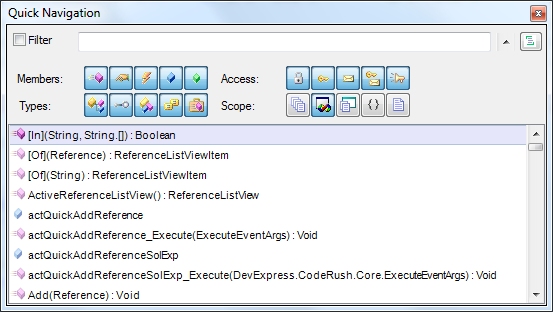
QuickNavigation

I don’t know about you but I often go kinda snow blind looking at all those icons for “Public property”, “Friend Method”, “Private Class”

However what very few people seem to know, is that you can preconfigure QuickNav to behave differently based on how you launch it.

That’s right you can create your own shortcuts (keystrokes) to launch QuickNav preconfigured for a specific type of search.

By adding just a couple of keystrokes, QuickNav can become IMHO a much more useful facility.

The 2 shortcuts I’m going to suggest I’m going to call “Find Types in Solution” and “Find Types and Members in File”. These are more descriptions of what they will do, rather than the names they will be given.

To add these shortcuts, follow the instructions in my previous post Binding a key in CodeRush and enter the information below in the appropriate boxes. At this point you will have added 2 very useful tools to your box o’ tricks

Find Types in Solution
Bind to : Suggest Ctrl+T
Command: QuickNav
Params: AllTypes, , AllVisibilities, CurrentSolution

Find Types and Members in CurrentFile
Bind to : Suggest Ctrl+M
Command: QuickNav
Params: AllTypes, AllMembers, AllVisibilities, CurrentFile

These bindings should allow you to navigate your code even easier than before :)

For reference, I will now quote from an early forum post by AlexS in which he details the possible parameters for the QuickNav command

-------------------------------------------------------------
There are 4 parameters for the QuickNav action:

TypeFilter -- defines default type filter for the Quick Navigation.
Use the following values to setup default type filter: Classes, Interfaces, Structs, Enums, Delegates, AllTypes.
Use "and" keyword to combine filters together like this: Classes and Structs
MemberFilter -- defines default member filter for the Quick Navigation.
Use the following values to setup default member filter: Methods, Properties, Events, Fields, LocalsAndParams, AllMembers.
Use "and" keyword to combine filters together like this: Methods and Properties.
AccessFilter -- defines default access filter for the Quick Navigation.
Use the following values to setup default access filter: Private, Protected, Internal, ProtectedInternal, Public, AllVisibilities.
Use "and" keyword to combine filters together like this: Private and Protected.
LocationFilter -- defines default location filter for the Quick Navigation.
Use the following values to setup default location filter: AllFiles, CurrentSolution, CurrentProject, CurrentNamespace, CurrentFile.
You can not use "and" keyword here to combine filters together.
Here are examples of parameters usage:

AllTypes, AllMembers, AllVisibilities, CurrentFile
AllTypes, AllMembers, AllVisibilities, AllFiles
AllTypes, AllMembers, Public and Protected, CurrentFile
-------------------------------------------------------------


Wednesday, December 16, 2009

DXCore Docs

People keep asking me where to start when learning to build plugins… specifically they ask me where the documentation is..

At this point I’m typically at a loss, because the docs (such as they are at this point) exist as collection of disparate articles, posts and references across a few locations:

So in an effort to centralize some answers to some of the more common DXCore related questions, I'm starting to put together some task based documentation at http://sites.google.com/site/dxcoredocs/

It is not intended that this will turn into an API reference ... That will ultimately be down
to DX.

However I'm being asked certain task based questions often enough, that it's
becoming worth my while to create some prebuilt answers of my own that I can point people at… and my blog isn’t the easiest place to browse through :)

Initially some of the content will redirect to relevant articles on my blog or posts in the Forums but with luck I will eventually find time to rewrite some of this content direct in DXCore Docs.

At the very least, new content will be presented via DXCore Docs in an effort to make it easier to browse and digest.

Also note that similar CodeRush based information is available at a similar site:http://sites.google.com/site/coderushdocs


Wednesday, November 04, 2009

CodeRush Scenarios


This is a simple post to point out some scenarios in which a tool like CodeRush can be invaluable.

Refactoring

Bashing out a quick algorithm.

I have no fear. I can hack out a working solution pretty quickly when I’m called upon to do so, but when done this way, it’s typically not very pretty. However, with a few keystrokes I can extract component parts of my ‘rough and ready’ algorithm to other methods, allowing me to sensibly reuse code which I might otherwise have copied and pasted and then had to maintain independently.

Tidy that Code.

The code I wrote last year is ugly. Hell, the code I wrote last week is ugly, when compared with what I wrote yesterday or today. All code can stand to be improved, but it’s rare that you want to go back and actually improve it because that code you wrote yesterday, is yesterday’s news. You don’t want to have to reconsider your old code because its time consuming and boring. Well some simple Refactorings, like ‘Rename’, ‘Extract Local’ and ‘Inline Temp’, really do help speed the process to the point where you can feel your code quality rising by the second, which can really enthuse you to do more.

Spreken zie code?

Ok… I don’t really speak any foreign languages but I do know what it’s like to have to interpret a foreign codebase. It’s hard. you rarely have the ear of someone whose uses the code, much less the moron who created it in the first place. With CodeRush, I can glide around the codebase renaming types, methods and variables as I see fit… Morphing the codebase ever closer to that illusive “Readable code”. I can do this completely safe in the knowledge that I am not altering the way the code works, just the way it reads.

Efficient Code Review.

Code-Reviews can take up a lot of time. The important part, is not tidying up the code, but imparting knowledge of why the suggestions are real improvements. You want to spend as much of your time “teaching the man to fish” rather than “throwing fish in the his general direction hoping he’ll catch one”. After all… if you “teach a man to code *well*” you wont have to “code well for him”. CodeRush helps you spend less of your time improving or correcting the code being reviewed, so that you can spend more of your time either explaining why the improvements are so good or simply get on with improving more code. Also, using CodeRush (even the Xpress version) has an added benefit that in addition to demonstrating good code, you are demonstrating the use of good coding tools.

CodeProviders

API-By-Example.

API-By-Example (also known as consume-first development) is a process where in you call a non-existent method… in a way you imagine that you would like to be able to call it… passing parameters in a way you see as sensible to do … and using any return value it produced in a way you see as reasonable… all without ever having actually coded the signature, or indeed any of the implementation, of the method in question. It’s like a big ol’ game of ‘Let’s pretend’. except that when you’re finished doing all of that, you get to hit a single key and generate this method’s signature exactly according to it’s usage.

You have just designed your first API-By-Example. Once generated, the method’s own signature can be used a partial spec against which a implementation can be built, safe in the knowledge that the call already makes sense in situé.

This sort of technique is great for creating library or framework code because you first define how you'd like to use it and then move on from there to the implementation. You arrive at a library which is much more usable because it was designed with it's usage in mind from the outset.

The CodeRush SmartTag
The CodeRush SmartTag contains both Refactorings and CodeProviders specific to the context in which you find yourself.

My personal favourites are:

  • Refactorings
    • Rename
    • Extract Local
    • Extract Method
    • Extract Property
    • Inline Temp
  • Code Providers
    • Declare Local
    • Declare Method (With parameters all in place based on your usage.)
    • Declare Property
    • Declare Field With Initializer

..but there are many more. :)

Which ones do you use most and in what situations ?

-------------------------------------------------------------------------------------------
For more details on CodeRush and other DevExpress products, check out their Facebook page
-------------------------------------------------------------------------------------------


Wednesday, August 26, 2009

CodeRush … Take some Time to Tune.


So you’ve just been handed a copy of CodeRush and told that it’s the future.. Whomever told you this, is very insightful and deserves much of your respect :D

After installing, the first thing you should do, is to give CodeRush an idea of how you like things done. I have decided to compile this little list of the options that I change and why, in the hopes that this will help ease you into working with your new best friend.

So options… where are they then?

Access to the options screen is granted via the options entry on the DevExpress menu.

If you see no DevExpress menu, then you either don’t have CodeRush installed, or you are running the Xpress version (I think MS asked that it not have the DevExpress menu)

If this is the case, you have 2 options…

  • Suck it up and hit Ctrl+Shift+Alt+O and your options should appear.
  • Bust out RegEdit and go to town on your registry. (Note that the latest version is 9.2 not 9.1)

Ok so now you’re into the options screen. Each page (on the left in the tree) is created and dynamically added to this tree by the plugin that it represents. This means that as a plugin developer I can seamlessly add pages to this tree for my own plugin.

Additionally some of the options pages are considered Advanced or Expert rather than the default of New User. see the little Level dropdown in the bottom left of this screen to alter your current setting. Further, some pages are language specific, so you’ll need to set the Language dropdown (a little to the right of the level dropdown) to the language you’re looking to configure.

So what settings do I alter?

Code Style (Editing\Code Style\Identifiers)

There are a few pages under Editing\Code Style which you should definitely browse through. I generally find the default to be more than satisfactory. However my own personal preferences differ slightly on the Identifiers page. I prefer Pascal Case for everything, but will prefix fields with an ‘m’ (for module level). This is purely a readability issue.

Organization(Editor\Organization\Member Mover)

This relates to the “Move to Region” function under the little icon to the left of each of your method signatures. If clicked, it presents you with a list of regions into which you might wish to move the method in question.

This list contains regions that already exist with the current code file. The options page allows you to preconfigure an additional list of regions which will appear in this menu, regardless of whether or not they already exist in the code file.

I tend to configure the following regions (each on a separate line)

Fields

Simple Properties
Constructors
UI Events

Extraction and Generation

There are several places in the options where CodeRush gives you the option to specify the location where generated code will appear, relative to your current position. I don’t like having to tell CodeRush where to place generated items each and every time. I’d far rather set up a default.

Therefore:
Create Method Stub (Editing\Refactorings\Create Method Stub)
Insert Method: After source method property.

Extract Method (Editing\Refactorings\Extract Method)
Insert new methods: Below the source method or property.

Extract Property(Editing\Refactorings\Extract Method)
Insert new properties: Below the source method or property.

Property To Method (Editing\Refactorings\Property To Method)
Insert method(s): After the source property.

Decompose Initializer (Editing\Refactorings\Decompose Initializer)
I don’t like an automatic “With block” so I turn this off (VB.Net Only)

Early Experience(Editing\Refactorings\Early Experience)

Hell Yeah :D
– The bleeding edge is where it’s at :) but perhaps this does not suit everyone.

Encapsulate Field(Editing\Refactorings\Encapsulate Field)
Insert New Property: Below the field. (Similar logic to other extractions)
When references to the field exist : Do not Replace anything.

I use properties for external access to a field. If I’m accessing the property from inside the class it’s a special case rather than the rule.

Templates (Editor\Templates)
I have always maintained my own little set of templates which I store in a Custom root folder. These need to be imported if I am starting from scratch. I suggest that you place any new Templates you create in a similar “Custom” root folder. This makes the export and import of these templates, all the easier.

Shortcuts (IDE\Shortcuts)
I like to place new shortcuts in a Custom folder. you’ll see a pattern in several of my choices for common keys. This is because I am already so well trained in the art of Alt+Tab

I assign Alt+` to CodeRushTrainingWindowToggle which allows me easy reach of said window, whenever I Forget something.

I assign Alt+1 to Refactor.

I assign Alt+2 to Navigate. I don’t use this as much as I’d like, but I’m learning (We never really stop learning eh?) Not got used to it yet, but I figure it’s the best place for it, given it’s proximity to Alt+1

I assign F2 to Refactor with a parameter of Rename. Ironically this is so that I don’t have to learn another shortcut. It is already deeply ingrained within me that I can rename a folder/file in windows explorer with F2, so it seemed like a good fit. this particular shortcut is already in CodeRush but is disabled. You can find it in the IDE\Shortcuts options page. In the 'Refactor!\Alternate Bindings' folder.


I guess that’s it for now. I’ll try to keep this post up to date with various changes I make to these settings. I assume there’s someone out there who’ll benefit :)


Tuesday, August 25, 2009

Why do I find CodeRush so indispensable?


I recently said “CodeRush has become an integral part of my workflow.”
and was asked by Braden Powers … “Do you have a blog post or something that explains why??”

I realized that I didn’t, and so here it is…

It comes down to the fact that I use certain facilities provided by CodeRush so often and without even thinking, that without CodeRush present, I end up spending several seconds staring at the screen wondering why some series of keystrokes isn’t doing what I think it should be.

Why should I ever be in such a situation. Well there are a couple of reasons.

  • Some of my colleagues have PCs that frankly cannot cope with Studio, so their chances of being able to cope with *any* addin are nil :( Using such a PC is sometimes unavoidable.
  • Sometimes I get caught on the hop. Between versions as it were. I have received a link to a beta or daily build of CodeRush and have been caught having already uninstalled my previous version and not yet having installed the new version. At this point it’s amazing how the universe almost always arranges a phone call to distract me… after which I forget that studio doesn’t currently have CodeRush.

So which facilities do I find to be most useful? Which ones to I use so often that I honestly forget that they are not a part of studio?

The answer is hard to define explicitly without currently being in one of the above scenarios but I will try.

Essentially the most used functions for me are those that are accessible from the CodeRush SmartTag menu. The Refactorings and the Code Providers.

Now between these 2 categories there are 225 separate functions. Obviously I don’t use all of these on a daily basis. If I were to be presented with the entire list every time I invoked the SmartTag, then I would go absolutely insane and dropkick CodeRush in a heartbeat.

CodeRush manages to provide a wonderfully intuitive interface here. Each Refactoring and Code Provider is intelligent enough to know if it is suited to your current context.

  • The Rename refactoring simply isn’t available if your caret is on a language keyword.
  • The Declare Class Code Provider isn’t available, unless the element under the caret is not currently declared and could potentially be a class.

This means that my one keystroke (I’ve rebound the CodeRush/Refactor key to ALT+1), I’m never presented with more than 5-8 options to pick from.

Next add to that, the fact that CodeRush moves the available items up and down on the menu based on your usage of those items. Constantly re-evaluating how far each should sit from the top of the menu.

Additionally, If CodeRush feels that there’s only 1 function which makes sense given the current context, then you can elect to have CodeRush not even show you the menu, but to move straight on to performing said function. So there’s even less for you to have to do.

ok Enough fluff… Which items do I use so often as to make Studio unusable without them

Note this is just my personal list.. CodeRush has much much more and these simply represent those facilities, whose absence actively slows me down.

First there are the Refactorings:

    • Rename
    • Extract Local
    • Extract Method
    • Extract Property
    • Inline Temp

I cannot stress enough how useful the above 5 Refactorings are in writing any code.

The ability to properly shape a solution as you go is phenomenal. I mean seriously… When you have to nail 2 bits of wood together … Do you use a rock or a proper tool like a hammer?

…Then there are the Code Providers

    • Declare Local
    • Declare Method
      • With parameters all in place based on your usage.
    • Declare Property
    • Declare Field With Initializer
      • Create a suitably named field of the correct type and assign the parameter to the field.
    • …and many more

…all available with a single keystroke (Alt+1 in my case)

Prototyping code has never been this easy

After this we are on to navigation:

  • Navigation
    • TabToNextReference
      • Place your caret on a variable and hit tab. CodeRush immediately underlines all references to this variable on the page and jumps to the next reference in the sequence. It should be noted that the “sequence” covers all references in your entire solution
    • References Tool Window(Shift F12)
      • The References tool window collates all references to any variable of your choice in a single location allowing you to seamlessly skip from one to another.

I feel I should also add add a quick section on the templating system here. I don’t use these nearly as much as I use the SmartTag facilities but it would be hard to since I’m sometimes hitting the CodeRush/Refactor key what seems like every 30 seconds or so.

So some of the template I use more than any others are:

  • Templates
    • Property declaration (pi, ps, pd8 etc)
      • Create properties of various types, with or without backing store, in only  couple of keystrokes.
    • ReadOnly Property declaration (ri, rs, rd8 etc)
      • As above but without the setters
    • Method Declaration (mi, ms, md8)
      • Same again but with methods.
    • Create Constructor (cc)
      • Generates a Constructor which takes various parameters based on your selection of any of the fields supported by the class.

Now It should be pointed out that prototyping any class is now insanely easy

c<space> – Class is created
vs<space>FirstName
vs<space>LastName
vi<space>Age

vi<space>GolfPar
4 Fields are now Created
cc<space><Enter> Constructor created
The constructor takes 4 parameters which are used to populate the fields.
Oh yeah and Readonly properties have been created to expose your fields. All of this is Totally configurable.

The final reason I can’t code without CodeRush is it’s extensibility. When I need something that CodeRush doesn’t have, I use it to create what I need using the DXCore plugin platform.

Checkout what others in the community have done with this amazing platform: Seriously check these out.