Friday, June 27, 2008

New Plugin "MSDN BCL Help"

So I just released another new plugin.

CR_MsdnBclHelp available from the Community Plugin Site

This one provides a single action "MSDN BCL Help" which causes your browser to launch a url pointing at the help page for the Type that your caret is situated on.

For example: When your caret is positioned on the word string within the phrase “Dim X as String”

I have bound this to the 'F1'  key combo in my copy of CodeRush.

To do this… visit the options screen via “DevExpress\Options” and locate IDE\Shortcuts

Create new “Keyboard shortcut” via the Toolbar button at the top and fill out “F1” (Or Alt+F1) as the key, and “MSDN BCL Help” as the command name.

Click Ok and wonder at how pressing F1 now launches the correct MSDN page for any Type your caret is situated on :)

For the ultimate “Lowband” (read quick) experience I highly recommend you follow the steps outlined on Craig Andera's wonderful post regarding the low bandwidth version of MSDN.

The primary download site for this DXCore plugin is http://www.rorybecker.me.uk/DevExpress/Plugins/Community/CR_MsdnBclHelp/

[Note: If you link here, please link to the folder not the file, as future versions will be named according to their version and old versions may be moved elsewhere.]

[Update: Recently (in build 322)this plugin has been enhanced to take direct advantage of MSDN’s low bandwidth facility. A new parameter has been added to allow you to specify ‘loband’ or ‘robot’ or any of a number of other options (detailed in Scott Hanselman's recent post. Simply pass the desired keyword in the parameter box as shown in the image below and click ok to take direct advantage of this new facility]

MSDNBCLHelp

Never has it been so easy to use Visual studio and MSDN together.


Thursday, June 26, 2008

'CType' is Slow to Type

Ok It's not slow but the way my mind works, I tend not to think of casting until after everything else which leaves me wanting to change...

-------------------------------------------------------------
Dim X as XElement = SomeFunctionThatGetsAnXNode()
-------------------------------------------------------------

...into...

-------------------------------------------------------------
Dim X as XElement = CType(SomeFunctionThatGetsAnXNode(), XElement)
-------------------------------------------------------------

...and the number of keystrokes necessary to do this is in my opinion excessive.

So a couple of days ago, rather than knock up some kind of refactoring (which may have been extreme overkill), I thought about how I might do this with a "Selection Embedding".

Here is what I did.

1.> Create a selection embedding using the right-most embedding type.

-------------------------------------------------------------
Follow these steps to get to the Embedding options page:

1. From the DevExpress menu, select "Options...".
2. In the tree view on the left, navigate to this folder:

    Editor\Selections

3. Select the "Embedding" options page.
-------------------------------------------------------------

Then create a new embedding as shown

SelectionEmbeddingCType

2.> Create a shortcut for it.

-------------------------------------------------------------
Follow these steps to get to the Shortcuts options page:

1. From the DevExpress menu, select "Options...".
2. In the tree view on the left, navigate to this folder:

    IDE

3. Select the "Shortcuts" options page.
-------------------------------------------------------------

Duplicate a shortcut from amongst those in 'Selection\Embedding'.

Then alter its details to give it a suitable keystroke (I chose 'c') and change the parameter to match the name of your selection embedding.

Finally change the context of the shortcut under Selection on the right so that a "line fragment" is required (ticked) and that "Whole line" and "Multi line" is excluded(Crossed)

SelectionEmbeddingKeybinding

After doing this I can now highlight a line fragment and hit C.

This results in the selected text now being wrapped in a CType cast with the caret in the correct location for me to type the class to cast to.

Note you could also have added a marker to the end of the embedding to allow "Esc" to take  you to it but I considered that hitting "End" to be simpler in this case.

Any way.... Job Done.

Questions?  :)


Ask me a question - I'll try to find the answer.

This morning I reached an old Hanselminutes (Number 115) sub-titled "Finding Passion for Software". Now I've not finished listening to this yet, but something about the early topics in the conversation made me want to post.

I hang in the DevExpress "IDE Tools" Forums (way more that my wife would like) helping anyone who wanders in with a question.

But it occurs to me that when learning a new Tech of any kind, sometimes there'll be a question or 2 that seem like the answer should be really obvious and so people decide not to ask for fear of looking foolish.

This is a great shame.

I want to make one thing abundantly clear...

...There is no such thing as a stupid question, only stupid answers (which btw you should tell me about, it's the only way I'll learn :P)
...I'm happy to help - Do you have a question regarding CodeRush, RefactorPro or the Black Magic that is the DXCore?

Seriously.. ask me....

Do you want to know...
...How to make a template to do X?
...How to add a "Selection Embedding" to CodeRush?
...What the F*** is a "Selection Embedding"? :P
...How to write a plugin to do X? (<- I really like this question. The last few times it was asked, I replied with fully functional example. I usually throw them up on The Community Plugin Site)
...Why doesn't X work?
...Is X a bug or am I just not understanding the idea behind Y?
...How do I write a Refactoring of my own?
...What is a Refactoring anyway?
...What is a "Code" Item?
...Can I create those too?
...How does "Code" Items differ from "Refactor" Items on that clever SmartTag menu thingy?
...What SmartTag Menu thingy? What the F** are you talking about?
...Are you doing drugs you sound a little insane? (Only Alcohol and Caffeine btw )
...What is a StringProvider?
...What is a TextCommand?
...What is a Field? (In the CodeRush sense)
...How many Experimental plugins are you playing with? (I have projects started for at least 8)

There are many questions you can ask. Like I said *none* of them are stupid.

Ok perhaps there is.... if you say "How do I write a plugin to do X?" without replacing *X*, then yeah, that's stupid. :P
But it takes that level of question to reach "Stupid"

The best place to ask me a question by far, is in one of the DevExpress "IDE Tools" Forums, but I will accept questions in the comments here or you can email me at RoryBecker[at]Gmail[dot]com.

I work 9-5 GMT(BST at the moment) and so can be a little slow to answer during this time but I'll try anyway.

Don't think that because you're a CodeRush/RefactorPro/DXCore newbie, that this is a bad thing.

Newbies are cool! They challange me to re-explore the stuff I thought I already knew. It's always worth doing that as more often than not I discover something I didn't know before. After all the IDE Tools are a moving target because DevExpress keep making them better :)

So go ahead..... Ask me a question. :)


Wednesday, June 25, 2008

Seth Rowe Blogs

Yup, Seth Rowe.  MVP who frequents the "microsoft.public.dotnet.languages.vb" newsgroup amongst others has started a blog.

You can find it here. I for one have already added his feed to my reader.


Tools

Some tools I use:

Dev Tools:

CodeRush - If you haven't tried this then you should $249 (when I last checked) for mere mortals, this wonderful tool is also available for FREE if you're an MVP and although not widely known, it includes RefactorPro in the price.

RefactorPro - By far the easiest way to refactor your code. Simple interface, quick to operate. A joy to use. $99 if you don't want CodeRush (you mad fool you :P)

DXCore Community Plugins (GoogleCode Binaries) Some open source plugins for DXCore/Refactor/CodeRush which myself and some other community members have been playing about with.

Reflector - For anyone who's curious how stuff works under the hood

Expresso - To say this is a WYSIWYG Regular expression tool does it a great disservice.

SketchPath - As above but for XPath expressions

MyGeneration - Free Code Generation Tool.


Other Tools:

Windows Live Writer - I'm writing this post using this wonderful tool. So easy.

OmeaPro - My nntp/ rss reader of choice.

Twhirl - My Twitter Client of choice. Follow me at twitter.com/RoryBecker

AutoHotKey - Windows automation on steroids.

NiftyWindows - AutoHotKey derivative program with many gestures and hotkeys prearranged.

Unlocker - Don't you just hate it when the file you need to delete/move/alter is locked


Thursday, June 05, 2008

Testing Refactorings - Part 2

In this post I will endeavour to explain how to test that your newly crafted refactoring affects your code in manner which you intend it to.

This is going to be a extension of the code supplied in a previous post: How to Test a Refactoring

We are going to add an additional test to our CreateStubForhandler tester to determine if the refactoring operates correctly for a given use case.

For this we have to supply the testing plugin with samples of code which indicate the desired 'before' and 'after' states of the refactoring.

Execute_1.vb looks like this
-------------------------------------------------------------
Namespace Test
    Public Class TestClass
        Public Sub TestMethod()
            Dim X As New System.Windows.Forms.Button
            AddHandler X.Click, AddressOf X_Click<<:caret:>>
        End Sub
    End Class
End Namespace

Namespace Result
    Public Class TestClass
        Public Sub TestMethod()
            Dim X As New System.Windows.Forms.Button
            AddHandler X.Click, AddressOf X_Click
        End Sub

        Private Sub X_Click(ByVal sender As Object, ByVal e As System.EventArgs)
            Throw New System.NotImplementedException()
        End Sub
    End Class
End Namespace
-------------------------------------------------------------
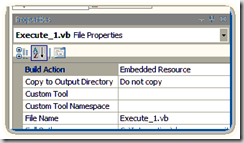
The Build action of this file should be set to Embedded Resource rather than Compile.
image

Then some calling code is necessary.
Initially, I went with the following:
-------------------------------------------------------------
    <Test("Test Execute 1", RESOURCE_PATH, "Execute_1.vb")> _
    Public Sub TestExecute_1(ByVal sender As Object, ByVal ea As TestEventArgs)
        AssertExecute()
    End Sub
-------------------------------------------------------------
But I found that my test would always fail, despite actually producing the correct results in the field (so to speak).

So what was wrong?

I traced into the code as it was running and quickly surmised what was happening.

The original refactoring uses a TargetPicker to allow the user to select a new location for the generated code to appear. The Test had no way of using this UI component to pick a location for the code to go and so effectively the test comparison was done immediately after launching the TargetPicker but before any changes had been made. In fact no changes are made during the course of this test because as things stand, the TargetPicker is never accepted.

So what to do.. Well I figured, let's ask the experts....

So one quick mail to 'da man' (that would be AlexZ) later, and everything became much clearer.

It seems that the big secret to coping with the TargetPicker is quite simple... Turn it off :)

Seriously...The given example was "Extract Method", wherein the user is given a configurable option to either use the picker or have Refactor Insert the extracted Code above or below the source method.

Well unfortunately, CreateStubForHandler has no such option.... So I created one. :) The latest code (revision 81 or better) include just such an option page for this setting.

So now that we have an option that can be set.... We need a way for our Test to set it.

This it turns out is the duty of a new class. DevExpress provide a class 'RefactoringHelper' which we inherit from to create 'CreateStubForHandlerLocalHelper'. It is an instance of this class that we pass to AssertExecute in the following manner.
-------------------------------------------------------------
    <Test("Test Execute 1", RESOURCE_PATH, "Execute_1.vb")> _
    Public Sub TestExecute_1(ByVal sender As Object, ByVal ea As TestEventArgs)
        AssertExecute(New CreateStubForHandlerLocalHelper())
    End Sub
-------------------------------------------------------------

So what goes into 'CreateStubForHandlerLocalHelper' then?

Well given the assumption of a few fields not mentioned, and the following utility code:
-------------------------------------------------------------
    Private Const Section As String = "OptionsCreateStubForHandler"
    Private Const POS_AFTER As String = "After"
    Private Const POS_BEFORE As String = "Before"
    Private Const KEY_DefaultPosition As String = "DefaultPosition"
    Private Const KEY_UseTargetPicker As String = "AllowTargetPicker"

    Private Shared Sub SaveSettings(ByVal Storage As DecoupledStorage, ByVal PositionSetting As String, ByVal AllowUserModifications As Boolean)
        Call Storage.WriteString(Section, KEY_DefaultPosition, PositionSetting)
        Call Storage.WriteBoolean(Section, KEY_UseTargetPicker, AllowUserModifications)
    End Sub

    Private Shared Sub LoadSettings(ByVal Storage As DecoupledStorage, ByRef DefaultPosition As String, ByRef UseTargetPicker As Boolean)
        DefaultPosition = Storage.ReadString(Section, KEY_DefaultPosition, POS_AFTER)
        UseTargetPicker = Storage.ReadBoolean(Section, KEY_UseTargetPicker, False)
    End Sub
-------------------------------------------------------------

All that this class really does, is override the 'UpdateOptions' method and use it to set the options correctly.
-------------------------------------------------------------
    Protected Overrides Sub UpdateOptions()
        MyBase.UpdateOptions()
        Using Storage As DecoupledStorage = GetStorage(PAGE)
            ' Load Existing setting into memory for later.
            Call LoadSettings(Storage, mDefaultPosition, mUseTargetPicker)
            ' Change setting for our own purposes.
            Call SaveSettings(Storage, "After", False)
        End Using
    End Sub
-------------------------------------------------------------
This method is called by the framework prior to the execution of the test, so that the use of the TargetPicker is abandoned and the new code is created "After" the original method just as required.

Et Voila... The test passes.

One final note.... As all good programmers, we really should clean up after ourselves. Shouldn't we?

What do we do about the fact that we just ransacked the main setting of this refactoring just so that we can run the test?

Where/How do we set the setting back to it's original value?

I searched high and I searched low but could not find a RestoreSetting method anywhere on the RefactoringHelper class.

It turns out though that the method we're looking for is called 'AfterExecute'. This method is called after execution of the refactoring but before the comparison.

The main purpose of this method, as I was introduced to it, it to allow you a suitable method in which to "SendKeys" characters into the IDE for testing things like "Rename" where more complex user input is required (see code below).
-------------------------------------------------------------
Protected Overrides Sub AfterExecute()
    CodeRush.Test.SendString(ActiveView.Handle, "SomeCharacters")
End Sub
-------------------------------------------------------------

But it's position within the Test lifecycle makes it a perfect place to restore those settings thus:

-------------------------------------------------------------
    Protected Overrides Sub AfterExecute()
        MyBase.AfterExecute()
        Using Storage As DecoupledStorage = GetStorage(PAGE)
            ' Restore Settings
            Call SaveSettings(Storage, mDefaultPosition, mUseTargetPicker)
        End Using
    End Sub
-------------------------------------------------------------

I am sorry this post was such a long time in coming. I can only claim that things at work are rather busy leaving less than an ideal amount of time for works such as this.

However I will keep going one way or the other.

Happy (plugin) coding.

Please feel free to email any questions to me (RoryBecker [at] Gmail [dot] com) or in the comments to this post.


Friday, May 16, 2008

New StringProvider - PickFromList

DX_PickFromListStringProvider is now available as a Community Project.

This plugin adds a single string provider which can be used in templates.

Usage is:
-------------------------------------------------------------
«PickFromList(Item1,Item2,Item3)»
-------------------------------------------------------------

This will create a popup, add the 3 items to it and present the user with the choice between them.

PickFromList 

The picked Item will be inserted into the text of the rendering template.

You can use as many of these as you like in a template.

The downer for now is that the template will expand in memory and so you will have to answer the various prompts before you see any of the resultant template.

I will at some point work on making the choice become an interactive part of the editor like the field links.


Wednesday, May 14, 2008

DXCore Plugin - CR_Paste

A plugin designed to let you paste code from your clipboard into studio translating it to VB.Net or C# as appropriate.

This plugin adds a 'Paste' menu to the context menu of the code editor in studio. 2 sub menus allow you to paste 'C# to VB.Net' or 'VB.Net to C#'.

A third (experimental) sub menu attempts to determine the type of the code on the clipboard and paste is as whatever type the currently open document registers as.

Currently there is no support for dealing with some subtle language differences like "switch vs Select" and VB.Net's Implicitly defined function variables.

This support will be forthcoming though.

In the meantime...enjoy what there is :)

Source:http://code.google.com/p/dxcorecommunityplugins/
Binary:http://www.rorybecker.me.uk/DevExpress/Plugins/Community/


Monday, May 12, 2008

New Plugin HighlightCurrentLineInEditor

I have created a new plugin called 'HighlightCurrentLineInEditor' which unsurprisingly highlights the current active line in the editor in a nice shade of blue.

I'm sure other enhancements will follow. Perhaps the ability to choose the color or change the length of the highlighted section ( currently stuck at 150)

As is the fashion (started by me :)), I have posted the code on Google Code at http://code.google.com/p/dxcorecommunityplugins/

Binary Downloadable from http://www.rorybecker.me.uk/DevExpress/Plugins/Community/

Enjoy

P.S. My apologies to AC for this not being the next 'Testing refactorings' post


Tuesday, March 11, 2008

DXCore Diagnostic Tools available.

Developer Express have made the DXCore Diagnostic tools available on their site.

As I read the info on the page in question (here), I see that this is in fact old news. But if I missed it then others may well have done so also.

These Tools include: The Expression Lab, The SourceRange Lab, The Event Lab and The Memory Lab.

Perhaps more will follow, but for now I think you'll agree that these should be a great deal of use.


Monday, March 03, 2008

StringProviders vs TextCommands

The problem
Recently asked on the DevExpress CodeRush Forum was a question relating to why a given user-created template did not appear to work.

The template in question was one designed to create a local variable of the same type as it's parent functions return type.

The template shown was:
-------------------------------------------------------------
«ReturnType» «Caret»«Field(«?FormatLocalName(«ReturnType»)»)»«BlockAnchor» = new «ReturnType»(«Field»);
-------------------------------------------------------------

The poster was hoping that this would produce...
-------------------------------------------------------------
List<Order> listOrder = new List<Order>();
-------------------------------------------------------------
...when the template was activated from within a function which returned a generic list of some type called 'Order'.

On the face of it, this is not an unreasonable expectation.

Why doesn't this work? 
To explain what is happening here it's important to understand 'ReturnType' is not a StringProvider. It is a TextCommand.

"So what....?" I hear you say.

Well TextCommands are like a 'void proc' in C# or a 'Sub' in VB.Net. Which is to say that they are functions which don't return a value and therefore they cannot really be passed to other StringProviders or TextCommands.

String providers on the other hand do support returning values (indeed that is their purpose. ie provide a string :) )

That begs the question: Why is ReturnType a TextCommand?
Well to tell you the truth I haven't a clue :) I do know however, that thanks to the wonder that is the DXCore, it's really easy to create a new StringProvider which adds exactly the functionality that the original poster wanted.

Create a StringProvider
The steps to create a valid StringProvider are quite simple.

A StringProvider lives in a Standard DXCore plugin Project. You need to create such a project and add a StringProvider Component to it's design surface.

Note: The StringProvider normally sits in the toolbox on the left hand side of visual studio. If it's not there, right-click and select 'Choose items'. This will allow you to select assemblies and, within them, components and controls which you can add to the toolbox. The StringProvider component is located in the 'DevExpress.CodeRush.Extensions.dll' assembly which is held in the GAC and can be referenced from the 'C:\Program Files\Developer Express Inc\DXCore for Visual Studio .NET\2.0\Bin' directory (by default).

Once the StringProvider is on your design surface, you should set a few of it's properties.

Name = "ReturnType"
Description = "Returns a string representing the name of the type returned by the activeMethod"
DisplayName = "ReturnType"
ProviderName = "ReturnType"

Finally handle the StringProvider's GetString Event with the following code:
-------------------------------------------------------------
ea.Value = CodeRush.Source.ActiveMethod.GetTypeName
-------------------------------------------------------------
Feel free to add a semi-colon if you're of the C# persuasion.

Use your new StringProvider
Once you compile your new StringProvider plugin, you should be able to access it like any other.

So instead of...
-------------------------------------------------------------
«ReturnType» «Caret»«Field(«?FormatLocalName(«ReturnType»)»)»«BlockAnchor» = new «ReturnType»(«Field»);
-------------------------------------------------------------
...we now have ...
-------------------------------------------------------------
«?ReturnType» «Caret»«Field(«?FormatLocalName(«?ReturnType»)»)»«BlockAnchor» = new «?ReturnType»(«Field»);
-------------------------------------------------------------

And we're done :)

Questions ?


Tuesday, February 12, 2008

How to Test a Refactoring

For this post I am going to assume that you are familiar with the basic process of unit testing using a tool such as NUnit.

I will now lead those who are interested through how I have created a simple test around Create Handler Stub.

Project Setup
The basic procedure for creating a suitable Refactor test project is:

  • Create a new Plugin Project
  • Remove the default plugin class
  • Add Reference to DevExpress.DXCore.Testing.dll
  • Add Reference to DevExpress.Refactor.Testing.dll
  • Add a class which inherits from DevExpress.Refactor.Testing.RefactoringTestFixture
  • Implement readonly string properties : 'FixtureName' , 'RefactoringName' and 'Language'

Tests
Next you will need to add suitable tests to your class.
Typically you are looking to test 2 things.

1.> The refactoring is/isnot available in a given situation
2.> The refactoring has a given effect on a given set of code.

Test by Example
DevExpress' Refactoring testing uses a very intuitive 'test by Example' style for it's testing

I call it 'test by example' because that's exactly what you do. You add example code files as resources to the project showing when you expect a refactoring to be available and what you expect to happen when it is activated.

Resource Files
The Resource files are simple code examples with small quantities of marked up used to provide the test framework with additional information such as the locate of the caret or an indication of what is selected.

[Note: These Resource files cannot be compiled in the normal fashion. The VB and C# compilers have no idea how to deal with the markup. Instead these files need have their 'Build Action' set to 'Embedded Resource'. They will be read later by the testing environment]

CheckAvailability Test (Source code)
So for our first test we are going to check availability for a given set of source. The Test Source is as follows:
-------------------------------------------------------------
Namespace Test
    Public Class TestClass
        Public Sub TestMethod()
            Dim X As New System.Windows.Forms.Button
            AddHandler X.Click, AddressOf OnClick<<:caret:>>
        End Sub
    End Class
End Namespace
-------------------------------------------------------------

Markup
The <<:caret:>> markup represents (strangely enough) the position of the caret in the test scenario. The << is not the « from CodeRush fields but instead just 2 sets of <.

So we save the above source code as 'Availability_1.vb' in a folder called  "Examples".

Next we have to create the Test itself. 
-------------------------------------------------------------
<Test("Availability for incomplete AddHandler Statement", "Refactor_CreateStubForHandler_Tests", "Availability_1.vb")> _
Public Sub TestAvailability_1(ByVal sender As Object, ByVal ea As TestEventArgs)
    Call AssertAvailable()
End Sub
-------------------------------------------------------------

.. I expect the previous code to be mangled by BlogSpot but the overall gist is simple.

In the constructor for the Test attribute, I have passed the name of the test, the path to the embedded resource needed and the name of the resource file used in this test.

[Note: When more than one test exists per refactoring, it is more than reasonable to extract the resource path out into a constant]

The call to AssertAvailable uses the Test attribute defined on the test to determine the location of the resource file which represents the scenario to test.

When it runs, it locates the resource and constructs the scenario in question, places the cursor at the given location and then tests the availability of the refactoring.

Running your test
In order to run the test you will require 'DX_TestRunner.dll' (Available by request through support@DevExpress.com according to Mark Miller). This should be placed in your plugin directory and when you run a copy of VS, you'll have an additional diagnostic ToolWindow available called 'Test Runner'

This looks like this:

image

You can now highlight your test or fixture and click the tick mark to check if your refactoring is available when it should be. If all goes to plan you should see something that looks like the following:

image

...together with a main editor window which confirms the results.

image

So that's how to make sure that your refactoring is available when you said it should be, without having to manually check each and every situation manually.

Next time I'll expand on how to check the your refactoring affects your code in the way that you said it should.

[Important Note: None of this information would be here if it were not for the very generous cooperation of Mr Alex Zaharov and Mr Mark Miller who lets face it, have a lot more to do than answer my questions. Thanks very much for your time guys]


Thursday, January 17, 2008

QuickTemplates

I was recently asked how to install QuickTemplates.

This is a perfectly reasonable request, however until now there has not been an online assembly.

So now I present QuickTemplates.DLL (Zipped).

This has been compiled against DXCore 3. (since I don't work with anything less than the latest bleeding edge stuff :))

So just drop it in "C:\Program Files\Developer Express Inc\DXCore for Visual Studio .NET\2.0\Bin\Plugins" ( by default) and Away you go.

You'll need to bind a key to the "Create Quick Template" action on the Shortcuts page in Options.

-------------------------------------------------------------
Follow these steps to get to the Shortcuts options page:

1. From the DevExpress menu, select "Options...".
2. In the tree view on the left, navigate to this folder:

    IDE

3. Select the "Shortcuts" options page.
-------------------------------------------------------------

This is still rough and ready, but it does the job.

Feel free to post comments or email if you need more help :)


Wednesday, January 02, 2008

A Simple Lazy-Load CodeRush Template

I can't tell you how often I've written this code manually.image

Or alternatively...

image

So I have finally created a couple of CodeRush Templates to facilitate this.

LLS (Lazy load Static) - Triggers the first expansion.
LLM (Lazy Load Module) - Triggers the 2nd expansion.
LL - Is aliased to LLS.

Templates are lower case in reality, but lowercase 'l' is easily confused with upper case 'I' in some fonts.

Feel free to download them from here and import them for your own use.


How to Rebuild your CodeRush Templates

Warning: Please be sure that you have Exported any Custom Templates that you care about before you attempt this.

The templates that you use day to day are stored in your user profile. If you need to rebuild them for some reason, then CodeRush will do so from it's own internal store which does not contain any customizations that you may have made.

Delete your existing Templates.

Deleting your existing Templates is a simple matter of finding the appropriate file and deleting it. These are organised by language under your profile directory.

Mine is located at "C:\Users\Rory.Becker.MyDomain\AppData\Roaming\CodeRush for VS .NET\1.1\Settings\Editor\Templates"

In this folder I have a number of files. I am only interested in rebuilding my Visual Basic ones but you should be able to find suitable files for each language you have been using.

If you are also working with VB.Net, then you should at this point delete (or Move if you're paranoid) 'templates.Basic.bin' and 'templates.Basic.xml'.

Rebuild your Templates.

Next you'll need to perform the actual rebuild.

-------------------------------------------------------------Follow these steps to get to the Templates options page:

1. From the DevExpress menu, select "Options...".
2. In the tree view on the left, navigate to this folder:

    Editor

3. Select the "Templates" options page.
-------------------------------------------------------------

Now if you make sure of viewing the templates for the language that you wanted to rebuild, you will find that all the standard templates are back.

Next you'll want to Import your Custom Templates


How to Import CodeRush Templates

-------------------------------------------------------------Follow these steps to get to the Templates options page:

1. From the DevExpress menu, select "Options...".
2. In the tree view on the left, navigate to this folder:

    Editor

3. Select the "Templates" options page.
-------------------------------------------------------------

Now...

  1. Select the folder containing the templates that you wish to export.
  2. Right Click the Folder
  3. Select Import Templatesimage 
  4. Locate an XML file containing previously exported Templates.
  5. Click Ok and you're done.

How to Export CodeRush Templates

So why would you want to export templates anyway?

Well Imagine that you've just downloaded the latest CodeRush build. version 3.0.5 at the time of writing.

Clearly you want to be able to take advantage of all the new templates that the geniuses (is that a word - Seems like it should be Genii) at DevExpress may have added.

But CodeRush is polite and understands that you may have added your own customizations to the existing template set and so the behaviour for CodeRush is to not alter your existing Templates (Stored in your Profile) but to do nothing ... just in case.

But you still want your new templates right? So how do you do it?

Well first you organise your own templates in a folder called (by convention) "custom". Then you export that folder of Templates and then ask CodeRush to rebuild you templates from scratch and finally Import your own templates back into CodeRush.

Simple right?

Well yes, but just in case, I have provided steps for each.

Exporting you custom Templates.

-------------------------------------------------------------Follow these steps to get to the Templates options page:

1. From the DevExpress menu, select "Options...".
2. In the tree view on the left, navigate to this folder:

    Editor

3. Select the "Templates" options page.
-------------------------------------------------------------

Now...

  1. Select the folder containing the templates that you wish to export.
  2. Right Click the Folder
  3. Select Export Folder image
  4. Select a location on disk to export to.
  5. Click Ok and you're done.

Wednesday, December 12, 2007

CreateStubForHandler - How does it work?

Our good friend Koen Hoefkens suggests that there might be some interest around the inner workings of the newly refactored CreateStubForHandler.

Versions
There are 2 versions of the plugin. One for DXCore 2.x (for VS2003) and another for DXCore 3.x (for VS2005 and VS2008).

This was done for 2 reasons:
Koen (the original author) has a few projects kicking around in VS2003, and so we needed to maintain a version of the code capable of producing a version of the plugin that could likewise run under the DXCore 2.x and hence under VS2003. I have a virtual machine setup to run VS2003 under XP and so I am in a position to test this project at my end if need be.

DevExpress have recently released a beta of DXCore 3.0 along with companion copies of RefactorPro and CodeRush. Now these new betas (like the full versions which will follow) only run inside of VS2005 or better but provide some interesting features which are not available in previous versions. Therefore I thought it would be good to create a version of the code which would take advantage of these new features where possible.

So to meet both of these requirements, we have divided the project into 2 parts and therefore 2 directories. The main trunk of the project contains directories called 'VS2003' and 'VS2008'. These house the Solutions and further directories and Projects suited to those environments.

Triggering the plugin
Each Project contains a plugin class created from a template drawn from the appropriate DXCore. These Plugin classes each use techniques and technology again suited to the version of the DXCore that they support. The DXCore 2.x uses an Action and a RefactoringProvider to trigger the plugins main functions, while the VS2008 version uses the same action logic together with a CodeProvider to achieve a similar effect.

The inner workings are the same for each due to their sharing of a common "PluginLogic.vb" file which lives in the VS2003 folder structure and is linked to from the VS2008 solution.

How does it work?
Essentially what happens is that whether activated by Action, RefactoringProvider or CodeProvider, much the same thing happens.

We have a main function "CreateMethodStub" which is passed 3 parameters:

  1. CaretElement: A LanguageElement which represents the element of code next to the caret at the time of activation. We can use a LanguageElement here because we're talking about an object on the sourcecode.
  2. InsertionPoint: A SourcePoint which tells the plugin where the newly generated method should be placed.
  3. CompleteStatement: A boolean indicating whether or not the AddHandler/RemoveHandler statement requires completion.

This function is responsible for organising the various stages of the plugin's operation. You can think of it as the core of this plugin. It delegates to other functions to do almost everything and then triggers the expansion of the code into the Active Document.

Build the New Method
The first step in generating code using the DXCore is to choose the correct root LanguageElement. That would be "Method" in this case since we are trying to create a method.

Next it's all about adding other suitable LanguageElements to that Method in the correct places and waving the "DXCore Magic Code Generation Wand".

Creating a method is easy:
-------------------------------------------------------------
Dim Method As New Method(MethodName)
Method.MethodType = MethodTypeEnum.Void
-------------------------------------------------------------
..Next we need to add some parameters which is normally easy also:
-------------------------------------------------------------
Dim SomeParam as New Param("System.String",ParamNameHere)
-------------------------------------------------------------

Constructing the correct signature
The difficulty here is that we can't just create any old parameters. We have to create parameters suited to the Event for which we are creating our handler method.

So how do work out what those are then?

If you need a quick refresher on why we're using IElement derived interfaces then take a quick peek here

Well we ask the DXCore for the declaration of the Event which we are attempting to attach to like this....
-------------------------------------------------------------
Dim TheDelegate As IDelegateElement = CType(EventDec.Type.GetDeclaration, IDelegateElement)
-------------------------------------------------------------
... the iterate the parameters of said delegate duplicating the params on the method...
-------------------------------------------------------------
For Each Param As IParameterElement In TheDelegate.Parameters
    Dim NewParam As New Param(Param.Type.FullSignature, Param.Name)
    NewParam.Direction = Param.Direction
    Method.Parameters.Add(NewParam)
Next
-------------------------------------------------------------

Add Some Content
Next we need to add some default content to that Method. We have decided to continue the original plan for now, and generate a statement to Throw a NotImplementedException.

So we offload the creation of the ThrowStatement on another simple utility function just so that our code can remain tidy.

Now we could just add this ThrowStatement to our Method.
this would be done by calling...
-------------------------------------------------------------
Dim TheThrow as ThrowStatement = GetThrowStatement("System.NotImplementedException")
Method.AddNode(TheThrow)
-------------------------------------------------------------
...but We'd like to be a bit more clever with our plugin.

Although the Throw statement is a good default, in 90% of cases the first thing you'd like to do once your plugin has finished doing it's thing, is to erase the throw and replace it with something more useful.

So how about we select the ThrowStatement ready to be overtyped, just like in a template.

In order to do this you need to Wrap the code in special Template Elements. If you've every created your own templates, you'll be familiar with «Caret» and «BlockAnchor». They are placed one at either end of your code, and once "Expanded", will cause CodeRush to select the text in the document

There are 2 problems with this.

  • We don't have any code to wrap
  • We don't have any LanguageElements to represent Template Elements.

Hmmmm.....what to do?

Ok it turns out that there is a special LanguageElement for inserting arbitrary text into your code. It's called SnippetCodeElement

So the first implementation of this looked a bit like....
-------------------------------------------------------------
Method.AddNode(New SnippetCodeElement("«Caret»")
Method.AddNode(GetThrowStatement("System.NotImplementedException"))
Method.AddNode(New SnippetCodeElement("«BlockAnchor»"))
-------------------------------------------------------------
But this had the annoying side effect of inserting a CRLF after the Throw and before the «BlockAnchor». In essence the CRLF got selected as well and this just wasn't right.

So a new approach had to be found. So I asked (as I did for much of this) AlexZ (of Developer Express), if he could explain how they did this and I received and embarrassingly simple solution.

Alex suggested pre-generating the code for the ThrowStatement, deliberately removing the trailing CRLF, wrapping the resultant code in the raw Template Element text and finally adding the whole lot to the method as a single SnippetCodeElement thus...

-------------------------------------------------------------
Dim ThrowStatement As [Throw] = GetThrowStatement("System.NotImplementedException")
Dim ThrowWithoutCRLF As String = GenerateWithoutCRLF(ThrowStatement)
Dim NewSnippetCodeElement As New SnippetCodeElement("«Caret»" & ThrowWithoutCRLF & "«BlockAnchor»" & ControlChars.CrLf)
Method.AddNode(NewSnippetCodeElement)
-------------------------------------------------------------

Producing the Code
Finally we wave that "DXCore Magic Code Generation Wand" I mentioned earlier by calling...
-------------------------------------------------------------
CodeRush.Language.GenerateElement(TheMethod)
-------------------------------------------------------------
...and the inserting that code in the correct location in our original document...
-------------------------------------------------------------
CodeRush.Documents.ActiveTextDocument.ExpandText(InsertionPoint, ControlChars.CrLf & MethodCode)
-------------------------------------------------------------

And now we're done. :)

Full source is available via SVN


Updated: the previously existing repository is still intact however the code has been copied to a new repository where future work will be continued from. this new repo can be found here here

Tuesday, December 11, 2007

LanguageElements, LiteElements and IElements

It's important to understand at least 2 out of these 3 terms when creating DXCore plugins.

  • A LanguageElement is a structure that represents a code structure defined in source code.
  • A LiteElement is a Friend (Or internal) class used internally by the DXCore. It represents a code structure defined in IL (like the framework itself). This is the one you don't really need to understand because you can't cast the object itself to this type , because this type in unavailable to you, the humble plugin programmer.
  • An IElement is an interface implemented by the previous 2 structures. It provides common access to properties provided by the previous structures allowing you to code against this interface rather than have to code against the previous 2.

These 3 structures are of course the ultimate parent structures of many derivatives.

So you should write your plugin analysis code in terms of IElement derived interfaces.

Of course you'll need to create LanguageElement derived objects when you need to generate code, but try to use the interfaces for any discovery work you need to do.

If you don't do things this way, then you'll find that you need to use LanguageElements to analyse the source code and Reflection to go looking through the framework classes.

Believe me... You Don't Want To Do This!

Apart from which, using the IElement derived structures in the DXCore is way easier and results in tighter plugin code all around

A small example
So imagine that you have the code...
-------------------------------------------------------------Public Structure SomeStruct
    Private DummyMember As Integer
End Structure
Public Class SomeClass
    Private X As SomeStruct
    Private Y As Integer
End Class
-------------------------------------------------------------
The return value from GetDeclaration for X will be an "IElement" which you can cast back to "Struct" which is a descendant of LanguageElement.

The return value from GetDeclaration for Y will be an "IElement" which you can would be able to cast back to "LiteStructElement", only it's not available from outside of the StructuralParser Assembly.

Both of these can be addressed in a uniform way however, by casting them to IStructElement

Note: The theory goes that since most LanguageElement derivatives will have a matching IElement derivative. you should attempt to work in terms of IElement when trying to analyse code. Simply because you should not assume that that which you are trying to analyse is modifiable.

So hopefully that sorts out any confusion as to why IElement derivatives are used so prolifically in plugins.


Friday, December 07, 2007

Plugin Development under Vista 64-bit

There are a minor issue affecting the development of plugins under 64-bit vista.

The basic issue is that your installation of Visual studio (assuming that you go for the defaults) will be under "C:\Program Files (x86)\" and defaults in a plugin project (and indeed other types of project) will point to a directory under "C:\Program Files\".

Now CodeRush /Refactor/DXCore will all install (by default) also under "C:\Program Files (x86)\" and it seems very hard to convince the OS to allow anything else.

All this means that you will compile and build plugins to a directory ( C:\Program Files\..etc..") which the DXCore is not looking in.

The simplest way I have found to solve this is to use a program like Junction Link Magic to create a "Junction Point" between a new Empty folder created at "C:\Program Files\Developer Express Inc\" and the real folder at "C:\Program Files (x86)\Developer Express Inc\".

A "Junction Point" is a "Magic Portal" between the empty folder and the specified destination. The effect of which, is to fool the FileSystem, and hence every program that makes use of it, into seeing all the files in both locations.

It should be noted that there is only one set of files, they are just visible in 2 places. If you delete anything it will vanish from both locations

So once this is done you can happily compile Dlls to one location and run them through DXCore from the other.